Package management is one of the first skills every Linux technician needs. It decides how software is installed, updated, verified, and removed. If you use the package tools the right way, systems stay consistent and patching is predictable. If you bypass them with random downloads, servers drift and incident response gets harder.
In current enterprise and training environments, you will usually see Debian 13.3, Ubuntu 24.04.3 LTS, Ubuntu 25.10, Fedora 43, RHEL 10.1, and older but still active RHEL 9.7 hosts. The commands are not identical across these families, but the core model is the same: trusted repositories, signed packages, dependency resolution, and transaction history.
How the package stack is built
It helps to separate the tools by layer:
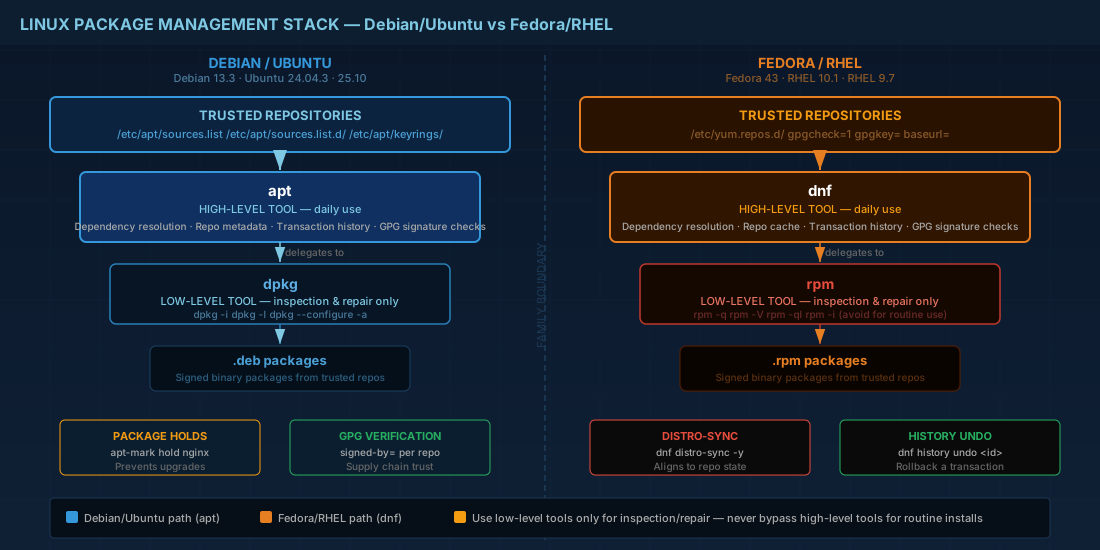
aptis the high-level package manager for Debian and Ubuntu.dpkgis the low-level installer for.debfiles.dnfis the high-level package manager for Fedora and RHEL.rpmis the low-level tool for.rpmfiles and package metadata.
On Debian 13.3 and Ubuntu 24.04.3/25.10, daily work should stay in apt. On Fedora 43 and RHEL 10.1/9.7, daily work should stay in dnf. Use dpkg or rpm directly for inspection, verification, or emergency repair, not for routine dependency handling.
Production consequence: if you install many packages directly with rpm -i or dpkg -i without resolving dependencies through dnf or apt, you can create partial states that break upgrades later.
Daily apt workflow on Debian 13.3 and Ubuntu
A safe update routine on apt-based systems is simple and repeatable. Run it in this order:
# Refresh metadata from configured repositories
sudo apt update

# Apply upgrades; use full-upgrade when dependency changes are expected
sudo apt full-upgrade -y

# Remove packages no longer needed
sudo apt autoremove -y

# Show what version would be installed from each repo
apt policy openssh-server
apt update refreshes package indexes only. It does not install updates. This distinction matters in automation: a nightly metadata refresh is low risk, while a nightly full upgrade needs change control.
When you need version stability, use holds and explicit checks:
# Prevent one package from being upgraded
sudo apt-mark hold nginx

# List held packages
apt-mark showhold

# Remove hold later
sudo apt-mark unhold nginx
Production consequence: holds can protect critical services during release windows, but forgotten holds leave systems unpatched. Teams should track holds in change tickets or configuration management.
dnf and rpm workflow on Fedora 43 and RHEL 10.1/9.7
Fedora 43 uses modern dnf behavior and RHEL 10.1 follows similar workflows. RHEL 9.7 remains widely deployed and keeps strong command compatibility for normal admin tasks like install, update, remove, history, and repo listing.
# Check available updates
sudo dnf check-update

# Apply all updates
sudo dnf upgrade -y

# Install a package
sudo dnf install -y tcpdump

# Show enabled repositories
sudo dnf repolist

# Review transaction history
sudo dnf history
For package-level inspection and integrity checks, use rpm:
# Is package installed?
rpm -q openssl

# List files installed by package
rpm -ql openssl | head

# Verify installed files against package metadata
sudo rpm -V openssl
If a bad update was applied, dnf history undo <id> can roll back that transaction when dependency conditions allow it. This is useful on RHEL 9.7 and 10.1, but do not treat it as a full disaster-recovery plan. Keep backups and tested restore steps.
Repository design and trust rules
Repositories are the real control plane. They decide what software your systems are allowed to install. Good repository hygiene is not optional in production.
On Debian and Ubuntu, repository definitions are in /etc/apt/sources.list, /etc/apt/sources.list.d/, and often Deb822-style .sources files. Newer practice is to store keyrings under /etc/apt/keyrings/ and use signed-by= per repository.
# Example: add a third-party APT repository with a dedicated keyring
sudo install -d -m 0755 /etc/apt/keyrings
curl -fsSL https://repo.example.net/keys/vendor.gpg | sudo gpg --dearmor -o /etc/apt/keyrings/vendor.gpg

echo "deb [signed-by=/etc/apt/keyrings/vendor.gpg] https://repo.example.net/apt stable main" | \
  sudo tee /etc/apt/sources.list.d/vendor.list > /dev/null

sudo apt update
On Fedora and RHEL, repository files live in /etc/yum.repos.d/. Keep gpgcheck=1 and pin to trusted base URLs:
sudo tee /etc/yum.repos.d/internal-tools.repo > /dev/null <<'REPO'
[internal-tools]
name=Internal Tools
baseurl=https://repo.example.net/rhel/$releasever/$basearch
enabled=1
gpgcheck=1
gpgkey=https://repo.example.net/keys/RPM-GPG-KEY-internal
REPO

sudo dnf clean all
sudo dnf makecache
Do not disable signature checks to "make install faster". Setting gpgcheck=0 or using unsigned repositories removes your supply-chain guardrail.
Production consequence: mixing many third-party repositories without priority control can pull unexpected package versions. That leads to ABI mismatches, failed boots after kernel updates, or application crashes after library replacement.
Common failures and recovery steps
When package operations fail, avoid random retries. Follow a short diagnostic sequence.
# Debian/Ubuntu recovery
sudo dpkg --configure -a
sudo apt -f install
sudo apt update

# Check lock holders if needed
sudo lsof /var/lib/dpkg/lock-frontend
# Fedora/RHEL recovery
sudo dnf clean all
sudo dnf makecache
sudo dnf distro-sync -y
sudo dnf historydistro-sync is important in RPM-based environments because it aligns installed package versions with repository state, including required downgrades. This often fixes systems where partial updates introduced version skew.
For production teams, the larger lesson is process: test updates in staging, use scheduled maintenance windows, and keep a known-good repository snapshot or mirror. Package managers are reliable, but only when your repository inputs are controlled.
Summary
Use apt for Debian 13.3 and Ubuntu 24.04.3/25.10 operations, and use dnf for Fedora 43 and RHEL 10.1/9.7 operations. Treat dpkg and rpm as low-level tools for inspection and repair. Keep repositories signed, minimal, and documented. For beginners, this builds consistent habits. For operators, it prevents drift and keeps patching predictable across mixed Linux fleets.


