If you are new to Linux administration, the filesystem can look messy at first. There are many top-level directories, and they all seem important. The good news is that Linux follows a layout standard called FHS, short for Filesystem Hierarchy Standard. FHS gives clear rules for where system files, application files, logs, and user data should live.
Learning this layout early saves time later. It helps you troubleshoot faster, write safer scripts, and avoid breaking package-managed files during upgrades.
What FHS means in real operations
FHS is not only documentation. It is an agreement between package maintainers, Linux distributions, backup tools, and admins. When software follows FHS, automation works better. Your monitoring checks find logs where expected. Your backup jobs capture the right directories. Your upgrade tools avoid local custom files.
For beginners, the biggest win is predictability. If a service fails, you usually check configuration in /etc, binaries in /usr/bin, logs in /var/log, and runtime state in /run. You do not need to guess.
# Quick map of important top-level paths
ls -ld / /etc /usr /var /home /tmp /run /opt /srv

# Check what is mounted and where
findmnt -o TARGET,SOURCE,FSTYPE,OPTIONS | head -n 20
Core directories and their job
Here are the directories you will use most often:
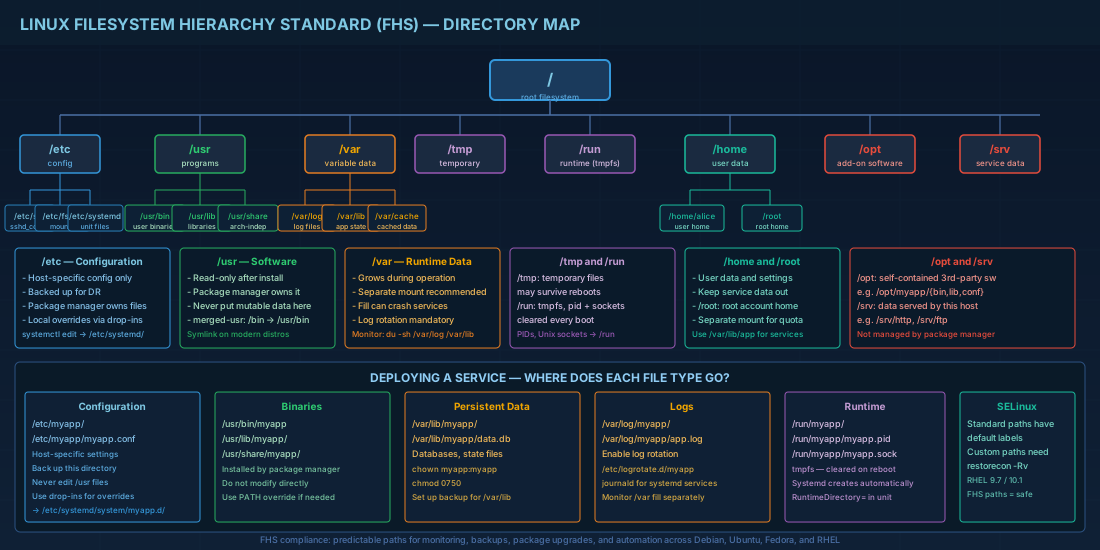
/etc: host-specific configuration
Store local config files here. Example: /etc/ssh/sshd_config, /etc/fstab, /etc/systemd/. In production, this is a high-value backup target because it holds node-specific behavior.
/usr: installed software and shared read-mostly data
Most packaged binaries live in /usr/bin and /usr/sbin. Libraries live under /usr/lib*. As a rule, do not place local mutable app data under /usr. Package managers own much of this tree.
/var: variable data that changes during runtime
Logs, queues, caches, and databases belong here. Common examples: /var/log, /var/lib, /var/spool, /var/cache. If /var fills up, services can fail even when root filesystem space looks fine.
/home and /root: user data
Regular users work in /home/<user>. The root account has /root. Keep service data out of home directories unless there is a clear reason, because it complicates permission models and backup policy.
/tmp and /run: temporary and runtime state
/tmp is for temporary files that can be deleted. /run is usually a tmpfs and is recreated at boot. Put PIDs and sockets in /run, not in persistent directories.
# Example: inspect disk usage in paths that often cause incidents
sudo du -sh /var/log /var/lib /tmp 2>/dev/null

# Check whether /run is tmpfs (expected on modern systemd hosts)
findmnt /run
Modern distro context: Debian, Ubuntu, Fedora, and RHEL
On Debian 13.3, Ubuntu 24.04.3 LTS, Ubuntu 25.10, Fedora 43, and RHEL 10.1, you should expect a merged-usr layout. In practical terms, legacy paths like /bin and /sbin are symlinks to paths under /usr. RHEL 9.7 systems are compatible with this model too, so scripts can usually follow the same assumptions.
# Verify merged-usr behavior
ls -ld /bin /sbin /lib /lib64
readlink -f /bin
readlink -f /sbin
Why this matters in production:
- Hardcoded paths in old scripts can fail if they assume a binary exists only in
/binor only in/usr/bin. Usecommand -vwhen possible. - When building minimal containers, include the correct
/usrcontent. Missing libraries under/usr/lib*is a common cause of startup failure. - Systemd unit files shipped by packages are vendor-managed. Local overrides should go in
/etc/systemd/system, not edited in place under vendor directories.
# Safe systemd override workflow (works across Debian/Ubuntu/Fedora/RHEL)
sudo systemctl edit nginx
# This opens an override file under /etc/systemd/system/nginx.service.d/

sudo systemctl daemon-reload
sudo systemctl restart nginx
sudo systemctl status nginx --no-pager
Common mistakes and their production impact
A frequent beginner mistake is writing app state into random custom paths, for example /opt/myapp/data, without backup and log rotation rules. The service works at first, then fails silently after growth. Keep mutable state in /var/lib/<app> and logs in /var/log/<app> so standard tooling can manage them.
Another mistake is editing packaged files directly in /usr. The change may disappear after package updates. Put local config in /etc and use drop-in directories where supported.
On RHEL 10.1 and RHEL 9.7, SELinux adds one more consequence: path choice affects labels. If data is stored in non-standard locations, services may get "permission denied" even with correct UNIX permissions. Standard FHS paths reduce this risk because default SELinux policies already expect them.
# Example: create standard state and log paths for a custom service
sudo install -d -m 0750 -o myapp -g myapp /var/lib/myapp
sudo install -d -m 0750 -o myapp -g myapp /var/log/myapp

# Optional on SELinux systems after custom path changes
sudo restorecon -Rv /var/lib/myapp /var/log/myapp
Simple checklist for daily work
Use this quick checklist when deploying or reviewing a Linux service:
- Config in
/etc, not in/usr. - Binaries from packages in
/usr/binor/usr/sbin. - Mutable app data in
/var/lib/<app>. - Logs in
/var/log/<app>with log rotation enabled. - Temporary files in
/tmpor/rundepending on lifetime. - Local service overrides in
/etc/systemd/system.
Conclusion
FHS gives Linux systems a predictable layout, and that predictability is operational value. For entry-level technicians, this means faster troubleshooting and fewer unsafe shortcuts. For production operators, it means upgrades are cleaner, backups are more reliable, and automation scripts behave consistently across Debian 13.3, Ubuntu 24.04.3 LTS and 25.10, Fedora 43, plus RHEL 10.1 and compatible RHEL 9.7 environments.


