Linux is not a single product. It is a stack of parts: the kernel, GNU and other userland tools, package repositories, service managers, and vendor support layers. For a Level 1 technician, this matters because troubleshooting depends on knowing which layer failed. If DNS breaks after an update, you need to know whether the issue came from NetworkManager, systemd-resolved, firewall rules, or the application itself.
In 2026, a practical baseline for entry-level operations usually includes Debian 13.3, Ubuntu 24.04.3 LTS, Ubuntu 25.10, Fedora 43, and enterprise environments on RHEL 10.1 or RHEL 9.7. You do not need to master all of them at once, but you should build a workflow that transfers across them.
Know the ecosystem layers before touching commands
Start with a mental map:
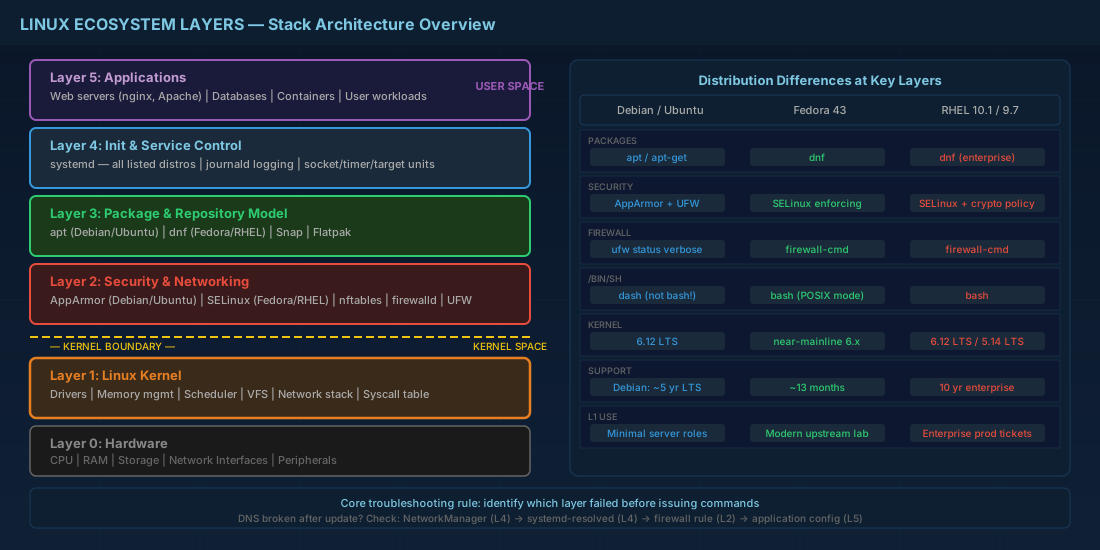
- Kernel: hardware drivers, scheduling, memory management.
- Userland: shell tools, libraries, core utilities.
- Init and service control: systemd on all distributions listed here.
- Package and repository model:
apton Debian/Ubuntu,dnfon Fedora/RHEL. - Security profile: SELinux (Fedora/RHEL), AppArmor (Ubuntu), and host firewall defaults.
Production consequence: if you treat Linux as one black box, you lose time during incidents. A restart may hide symptoms without fixing root cause. Level 1 work is mostly fast diagnosis and safe first actions.
Current distro context and compatibility notes
These distributions share many commands, but default behavior differs:
| Distribution | Package tool | Security default | Level 1 note |
|---|---|---|---|
| Debian 13.3 | apt | AppArmor available | Stable base, common in minimal server roles. |
| Ubuntu 24.04.3 LTS | apt + snap | AppArmor + UFW workflow | LTS for predictable patch cycles in production. |
| Ubuntu 25.10 | apt + snap | AppArmor | Useful for lab learning; shorter support window. |
| Fedora 43 | dnf | SELinux enforcing by default | Good for learning modern upstream behavior. |
| RHEL 10.1 | dnf (enterprise repos) | SELinux + stricter crypto policies | Standard in enterprise support contracts. |
| RHEL 9.7 | dnf | SELinux enforcing by default | Most day-to-day commands remain compatible with 10.1. |
Compatibility note: scripts written for RHEL 9.7 usually run on RHEL 10.1 if they avoid deprecated package names and do not assume legacy crypto defaults. For Level 1 teams, this means writing explicit checks in shell scripts instead of hardcoding one OS version.
Level 1 roadmap: what to learn first and why
Use this order so each step supports incident response work.
Step 1: Host identity and package operations
Learn how to identify the OS, update safely, and install tools without breaking dependencies.
# Detect distribution and version
cat /etc/os-release
uname -r

# Debian / Ubuntu
sudo apt update
sudo apt install -y curl vim htop

# Fedora / RHEL
sudo dnf makecache
sudo dnf install -y curl vim htop
Production consequence: knowing your package manager prevents wrong-command mistakes during outages. Running apt instructions on RHEL wastes time and can confuse junior teams.
Step 2: Services, logs, and boot state
Most Level 1 tickets involve services not starting, ports not listening, or failed boots after updates.
# Check a service lifecycle
sudo systemctl status nginx
sudo systemctl restart nginx
sudo systemctl enable nginx

# Read recent logs for one unit
sudo journalctl -u nginx -n 80 --no-pager

# Show failed units after boot
systemctl --failed
Production consequence: quick log filtering reduces escalation noise. Instead of "service is down," you can report "failed due to permission denial on /var/www/html" with evidence.
Step 3: Users, permissions, and sudo boundaries
Entry-level operators often break systems through incorrect ownership or broad sudo access.
# Create a support user with a home directory
sudo useradd -m -s /bin/bash support01
sudo passwd support01

# Add to sudo group (Debian/Ubuntu) or wheel (Fedora/RHEL)
sudo usermod -aG sudo support01
# sudo usermod -aG wheel support01

# Verify ownership before and after a deployment
ls -ld /var/www/app
sudo chown -R www-data:www-data /var/www/app   # Debian/Ubuntu example
# sudo chown -R nginx:nginx /var/www/app       # Fedora/RHEL common pattern
Production consequence: wrong ownership creates outages that look like application bugs. A Level 1 technician should always verify file owner/group before restarting services.
Step 4: Network checks and firewall basics
Use a short checklist: interface up, route present, port listening, firewall rule loaded.
# Interface and route
ip -br addr
ip route

# Check listening ports
sudo ss -tulpen | grep -E ':80|:443|:22'

# Debian/Ubuntu firewall workflow
sudo ufw status verbose

# Fedora/RHEL firewall workflow
sudo firewall-cmd --get-active-zones
sudo firewall-cmd --list-services --zone=public
Production consequence: you can separate app failure from network policy failure in minutes. This is one of the biggest time savers in on-call work.
Building habits that survive real production work
Level 1 is less about memorizing commands and more about repeatable habits:
- Record every action in the ticket: command, host, output summary.
- Before changes, capture baseline data with
systemctl status,df -h, and recent logs. - After changes, re-check service state and error logs instead of assuming success.
- Use small reversible steps; avoid multi-command one-liners during incidents.
For mixed fleets, keep a compatibility note in your runbook: Debian and Ubuntu rely on apt workflows; Fedora and RHEL rely on dnf and SELinux-aware troubleshooting. RHEL 9.7 and 10.1 are close enough for shared Level 1 runbooks, but always validate package names and policy differences before automation rollout.
Conclusion
Your Level 1 roadmap should start with operating-system identification, package management, systemd, logging, permissions, and network checks. These skills transfer across Debian 13.3, Ubuntu 24.04.3 LTS, Ubuntu 25.10, Fedora 43, and RHEL environments. If you can collect evidence fast, apply safe fixes, and explain production impact clearly, you are already working at a strong operations baseline.


