When RAM starts to fill up, Linux has to make space. It can drop file cache, write dirty pages, or move some memory pages to swap. That process is called memory reclaim. If reclaim cannot free enough memory fast enough, the kernel may kill a process with the OOM (out-of-memory) killer.
For entry-level technicians, swap can feel confusing because it looks like "extra RAM" in monitoring tools. It is not extra RAM. Swap is disk-backed memory, so it is much slower than RAM. It is still useful because it gives the kernel room to breathe during short spikes and can prevent immediate crashes.
RAM, swap, and memory pressure in plain terms
Linux keeps active data in RAM because RAM is fast. Swap is a fallback area, usually a partition or swapfile, where less-active anonymous pages can be moved. "Anonymous" means process memory that is not a regular file cache page.
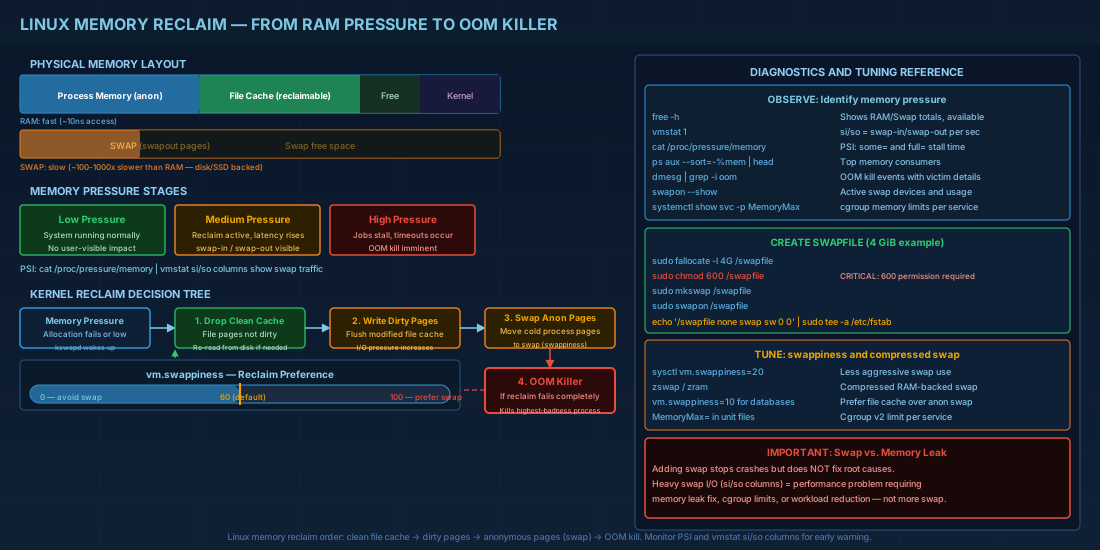
Memory pressure means the system is spending noticeable effort trying to free memory. At low pressure, users do not notice anything. At high pressure, response times increase, jobs stall, and eventually an OOM kill can happen.
# Quick health snapshot
free -h
swapon --show
cat /proc/meminfo | egrep 'MemTotal|MemAvailable|SwapTotal|SwapFree'

# Live view: si/so columns show swap-in and swap-out activity
vmstat 1

# Pressure Stall Information (PSI): how long tasks waited on memory
cat /proc/pressure/memory
Practical consequence: a system can show "free swap" and still be unhealthy if swap-in/swap-out is continuous. The real symptom to watch is latency and stalled work, not only percentage used.
How Linux reclaims memory and when OOM starts
Reclaim follows an order. Linux usually drops clean file cache first because it can be read again from disk. If pressure continues, it may write dirty pages and swap out colder anonymous pages. If this still does not meet demand, the kernel picks a victim process and kills it.
On modern systems, memory control groups (cgroups v2) and service managers can trigger kills inside a limited scope before the whole host collapses. That is better for shared servers because one runaway service is less likely to take everything down.
# See recent OOM events and victims
sudo dmesg -T | grep -i -E 'out of memory|oom-killer|killed process'

# If systemd journals are used
sudo journalctl -k -g 'oom|Out of memory'

# Check cgroup memory limits for a service
systemctl show your-service.service -p MemoryMax -p MemoryHigh -p MemorySwapMax
Beginner consequence: you might think "Linux killed the wrong process." Often the victim had high badness score or belonged to the stressed cgroup. Operator consequence: set explicit limits and priorities for critical services so emergency kills are predictable.
Create and persist swap space safely
A swapfile is usually the easiest option on virtual machines and cloud hosts. The steps are straightforward, but permissions matter because swap may contain sensitive memory pages.
# Example: create a 4 GiB swapfile
sudo fallocate -l 4G /swapfile
# If fallocate is not suitable on your storage, use dd instead
# sudo dd if=/dev/zero of=/swapfile bs=1M count=4096 status=progress

sudo chmod 600 /swapfile
sudo mkswap /swapfile
sudo swapon /swapfile

# Persist after reboot
echo '/swapfile none swap sw 0 0' | sudo tee -a /etc/fstab

# Verify
swapon --show
free -h
Always set `chmod 600` before enabling swapfile use. World-readable swap can leak data from process memory.
If you use Btrfs, swapfiles need extra care (for example, no compression and no copy-on-write on the swapfile path). If your team is new to Btrfs swapfile rules, a dedicated swap partition is often safer operationally.
Tuning knobs that actually change behavior
The first knob most teams touch is `vm.swappiness`. It controls reclaim preference between swapping anonymous memory and reclaiming file cache. Lower values reduce swap tendency, higher values allow earlier swap use.
# Check current setting
sysctl vm.swappiness

# Temporary change until reboot
sudo sysctl -w vm.swappiness=20

# Persistent setting
printf 'vm.swappiness = 20\n' | sudo tee /etc/sysctl.d/99-memory-tuning.conf
sudo sysctl --system
There is no universal best number. Database-heavy servers may prefer lower swappiness. Mixed workloads sometimes run better with moderate values so cache reclaim and swap stay balanced.
Another tool is compressed swap paths. `zswap` compresses pages before writing to real swap. `zram` creates a compressed RAM-backed swap device. Both can reduce I/O pressure, but they are not free because compression uses CPU.
Distro compatibility notes (Debian 13.3, Ubuntu 24.04.3/25.10, Fedora 43, RHEL 10.1/9.7)
Core commands (`swapon`, `swapoff`, `mkswap`, `sysctl`) work the same across these distributions. Differences are usually defaults, not syntax.
| Distribution | Package manager context | Operational notes |
|---|---|---|
| Debian 13.3 | `apt`; `procps` and `util-linux` tools available by default on standard installs | Stable baseline for swapfile and `sysctl` tuning runbooks. |
| Ubuntu 24.04.3 LTS and Ubuntu 25.10 | `apt`; cloud images often include swapfile defaults that vary by image profile | Check real state with `swapon --show` instead of assuming image defaults. |
| Fedora 43 | `dnf`; modern kernel memory telemetry available | On Btrfs-heavy deployments, validate swapfile requirements before rollout. |
| RHEL 10.1 and RHEL 9.7 | `dnf`; enterprise support tooling around tuned/systemd available | Runbooks are mostly cross-compatible between 9.7 and 10.1 for swap and reclaim diagnostics. |
For mixed fleets, keep one baseline procedure and branch only where filesystem defaults or service limits differ.
Practical incident checklist for memory pressure
During an incident, speed matters. This sequence works for beginners and operators because it separates observation from risky changes.
# 1) Confirm pressure and user impact
uptime
vmstat 1 10
cat /proc/pressure/memory

# 2) Identify top memory consumers
ps -eo pid,ppid,cmd,%mem,%cpu --sort=-%mem | head -n 15

# 3) Check swap activity and OOM history
swapon --show
sudo dmesg -T | grep -i -E 'oom|killed process' | tail -n 20

# 4) Apply low-risk actions first
# - Restart a leaking non-critical service
# - Reduce concurrency in batch workers
# - Add temporary swap only if storage I/O can handle it

# 5) After stabilization, fix root cause
# - memory leak, wrong limits, oversized cache, or bad workload scheduling
Production consequence: adding swap can stop immediate crashes, but it does not fix leaks or bad limits. Treat swap changes as stabilization, then follow with root-cause work.
Summary
Swap is a safety tool, not a performance feature. It helps Linux survive bursts, but heavy swap traffic usually means real memory pressure. Watch PSI, `vmstat`, and OOM logs together so you understand behavior instead of guessing from one metric.
For day-to-day operations on Debian 13.3, Ubuntu 24.04.3 LTS and 25.10, Fedora 43, and RHEL 10.1 with RHEL 9.7 compatibility, keep the process simple: verify current state, apply careful changes, and document what happened. That habit prevents repeat outages.


