Linux has three common ways to schedule work: cron, anacron, and systemd timers. Beginners often learn only cron first, then run into missed jobs, duplicate runs, or no logs during incidents. This guide explains where each tool fits, what can go wrong in production, and how to choose safely on Debian 13.3, Ubuntu 24.04.3 LTS, Ubuntu 25.10, Fedora 43, RHEL 10.1, and RHEL 9.7.
when to use cron, anacron, or systemd timers
Use the scheduler that matches the machine behavior and the job criticality.
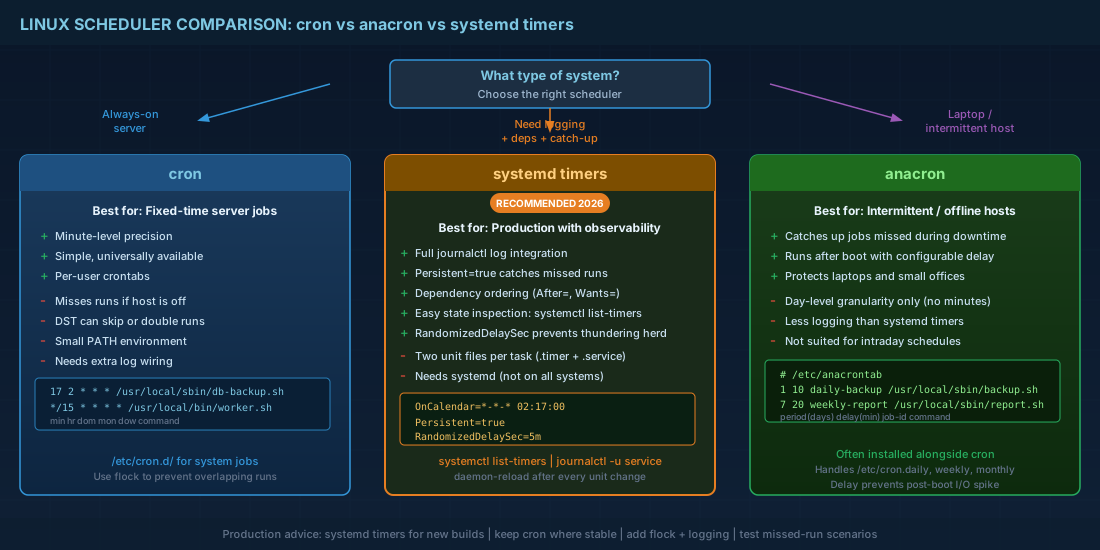
cron: best for fixed times on machines that stay on, such as servers in a data center.anacron: best for daily or weekly jobs on machines that may be off at the scheduled time, such as laptops or small office hosts.systemd timers: best when you need dependency control, better logging, and clear state inspection withsystemctl.
Production consequence: choosing the wrong scheduler causes silent data loss. A nightly backup in plain cron is useless if the host is powered off at 02:00 every night. Anacron or a persistent systemd timer is safer in that case.
cron: simple and fast, but easy to misuse
Cron runs commands at exact calendar times. The format is minute, hour, day of month, month, day of week, then command.
# Run every day at 02:17
17 2 * * * /usr/local/sbin/db-backup.sh

# Run every 15 minutes
*/15 * * * * /usr/local/bin/queue-worker.sh
For system jobs, prefer files in /etc/cron.d/ so the schedule is versioned and reviewable.
# /etc/cron.d/db-backup
SHELL=/bin/bash
PATH=/usr/local/sbin:/usr/local/bin:/usr/sbin:/usr/bin:/sbin:/bin
MAILTO=ops@example.com

17 2 * * * root flock -n /run/lock/db-backup.lock /usr/local/sbin/db-backup.sh >> /var/log/db-backup.log 2>&1
Important details:
- Cron uses a small environment. Always set
PATHand use absolute command paths. - Without locking, a slow job may still run when the next cycle starts. Use
flockor another lock method. - Cron does not "remember" missed runs by default. If the machine was off, that run is gone.
- Daylight saving time can cause skipped or double runs for local-time schedules around the clock change.
For beginners, the biggest mistake is testing only the command, not the cron environment. Always test the exact command line and user context that cron will use.
anacron: catch up jobs that were missed
Anacron is designed for jobs that should run daily, weekly, or monthly even if the machine was off at the planned time. It does not schedule by minute. It schedules by period in days.
# /etc/anacrontab
# period (days)   delay (minutes)   job-id         command
1                 10                daily-backup   /usr/local/sbin/db-backup.sh
7                 20                weekly-report  /usr/local/sbin/weekly-report.sh
30                30                monthly-trim   /usr/sbin/fstrim -av
How it works in practice:
- If a daily job was missed while the host was down, anacron runs it after boot and after the configured delay.
- The delay avoids heavy disk and CPU load immediately after startup.
- Job IDs prevent duplicate state tracking; keep them stable once deployed.
Production consequence: anacron protects routine maintenance on intermittently powered systems. Without it, log rotation, trim, or report generation may stop for days and fail only when disk pressure becomes visible.
systemd timers: stronger control and better troubleshooting
Systemd timers separate "what to run" from "when to run". You define a service unit for the task and a timer unit for the schedule. This is a clean model for operations because you get dependency control, persistent catch-up behavior, and journal logs.
# /etc/systemd/system/db-backup.service
[Unit]
Description=Nightly database backup
Wants=network-online.target
After=network-online.target

[Service]
Type=oneshot
ExecStart=/usr/local/sbin/db-backup.sh
User=root
Group=root
# /etc/systemd/system/db-backup.timer
[Unit]
Description=Run db-backup daily at 02:17
[Timer]
OnCalendar=*-*-* 02:17:00
Persistent=true
RandomizedDelaySec=5m
[Install]
WantedBy=timers.target# Apply and start
sudo systemctl daemon-reload
sudo systemctl enable --now db-backup.timer
# Verify next and last runs
systemctl list-timers db-backup.timer
systemctl status db-backup.timer --no-pager
# Read logs from the task itself
journalctl -u db-backup.service -b --no-pagerPersistent=true is a key setting. If the host was down at the scheduled time, the timer triggers after boot. That gives you anacron-like catch-up behavior but with better observability.
For operators, systemd timers reduce incident time. You can quickly answer: "Did the schedule trigger? Did the service fail? What was stderr?" Cron often needs extra log plumbing to answer the same questions.
compatibility notes for Debian, Ubuntu, Fedora, and RHEL
| Distribution | Practical compatibility notes |
|---|---|
| Debian 13.3 | cron and systemd timers are standard. Install and enable anacron when hosts are not always online. Verify with systemctl status cron and systemctl list-timers. |
| Ubuntu 24.04.3 LTS | Long support lifecycle favors explicit timer units checked into config management. Use persistent timers for patch windows and maintenance reboots. |
| Ubuntu 25.10 | Same timer features as LTS, but with faster package churn. Re-test custom calendars and dependency assumptions during release upgrades. |
| Fedora 43 | Fedora commonly uses cronie for cron behavior and supports full systemd timer workflows. Good platform for migrating cron jobs to units before enterprise rollout. |
| RHEL 10.1 | Systemd timers are production-ready and map cleanly to compliance workflows because state and logs are easy to audit. Cron remains available for simple fixed-time tasks. |
| RHEL 9.7 compatibility | Timer unit syntax used above is compatible. Validate unit dependencies and SELinux contexts when moving scripts from 9.7 to 10.1 systems. |
production checklist before you trust a schedule
Run this checklist for every new scheduled task:
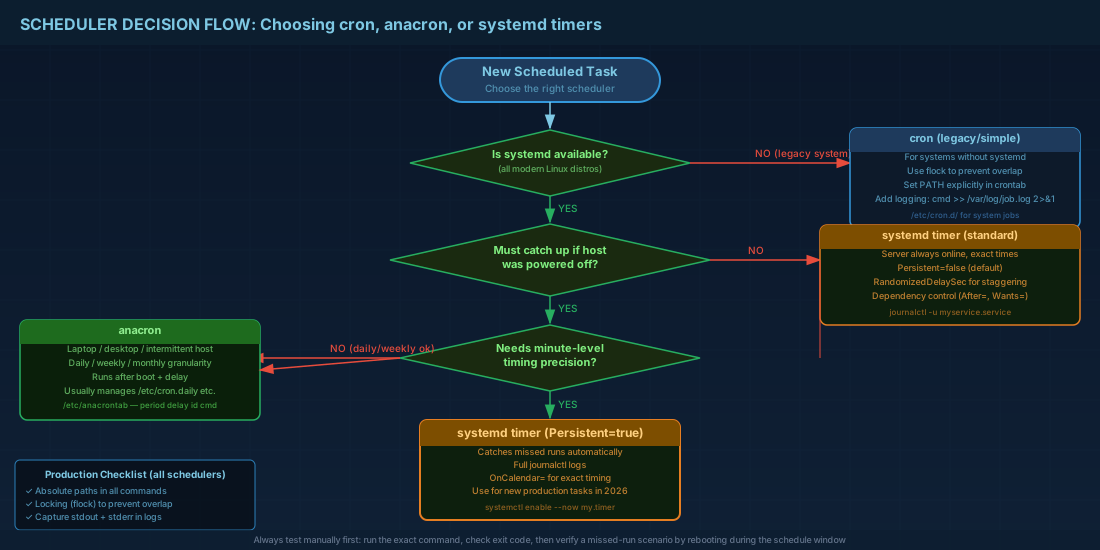
- Use absolute paths in commands and scripts.
- Set locking to avoid overlapping runs.
- Capture stdout and stderr, or rely on journal logs for timer-based jobs.
- Test a forced run manually and verify exit code.
- Test a missed-run scenario: reboot during schedule window and confirm catch-up behavior.
- Document owner, purpose, timeout, and rollback action.
# Manual test and exit code check
sudo /usr/local/sbin/db-backup.sh
echo $?

# For systemd timer jobs, run exactly as unit does
sudo systemctl start db-backup.service
sudo systemctl status db-backup.service --no-pager
journalctl -u db-backup.service -n 50 --no-pager
Beginner consequence: this checklist prevents "it worked once in terminal" mistakes. Operations consequence: this reduces surprise failures during reboots, DST changes, and heavy-load periods.
summary
Use cron for simple fixed-time server jobs, anacron for delayed catch-up on systems that are often offline, and systemd timers when you need stronger control and observability. If you are building new production schedules in 2026-era distributions, systemd timers are usually the safest default. Keep cron where it is already stable, but add locking, explicit environment settings, and verification steps so missed or duplicate runs do not become hidden operational debt.


