If you are learning Linux administration, you need a place where mistakes are cheap. A virtual lab gives you that place. You can test package upgrades, firewall rules, SSH settings, and automation scripts without risking your laptop or a company server. The key is to build the lab so rollback is fast. That is where snapshots matter.
why a safe lab matters in real operations
Entry-level technicians often learn by trial and error. That is normal. The risk starts when experiments happen on systems that carry real data or are shared by a team. A wrong sudo rm, a broken network config, or a bad repository setting can cost hours.
In production, rollback time is part of uptime. The same habit should be learned in the lab. If each test has a known rollback point, you can move faster and still stay in control.
For beginners, this means less fear and more practice. For operators, this means better change discipline. The workflow is simple: create snapshot, apply change, verify, then keep or revert.
pick a host setup that supports snapshots well
Use one Linux host as your lab base, then run multiple guest VMs. KVM with libvirt is a solid default on modern Linux distributions. It is available on Debian 13.3, Ubuntu 24.04.3 LTS, Ubuntu 25.10, Fedora 43, RHEL 10.1, and RHEL 9.7.
Snapshot behavior depends on disk format. Use qcow2 for flexible snapshots on KVM. If you use raw disks on plain filesystems, you lose easy internal snapshots. You can still snapshot with LVM or storage backend tools, but workflow gets more complex for beginners.
# Debian 13.3 / Ubuntu 24.04.3 LTS / Ubuntu 25.10
sudo apt update
sudo apt install -y qemu-kvm libvirt-daemon-system libvirt-clients virtinst bridge-utils
sudo systemctl enable --now libvirtd
sudo usermod -aG libvirt $USER

# Fedora 43 / RHEL 10.1 / RHEL 9.7
sudo dnf install -y qemu-kvm libvirt virt-install virt-manager
sudo systemctl enable --now libvirtd
sudo usermod -aG libvirt $USER
After adding your user to the libvirt group, log out and back in. Verify virtualization works:
virsh list --all
virt-host-validate
If virt-host-validate reports CPU virtualization missing, enable Intel VT-x or AMD-V in BIOS/UEFI first. Without it, guests may run very slowly or fail to start.
create a baseline vm and first clean snapshot
Start with one template VM. Install updates, set timezone, create your admin user, and configure SSH keys. This becomes your clean baseline. Do not install random tools yet.
# Create a 30G qcow2 disk
qemu-img create -f qcow2 /var/lib/libvirt/images/lab-debian13-base.qcow2 30G

# Example VM creation with Debian ISO
virt-install \
  --name lab-debian13-base \
  --memory 4096 \
  --vcpus 2 \
  --disk path=/var/lib/libvirt/images/lab-debian13-base.qcow2,format=qcow2,bus=virtio \
  --cdrom /var/lib/libvirt/boot/debian-13.3-amd64-netinst.iso \
  --network network=default,model=virtio \
  --os-variant debian12 \
  --graphics none \
  --console pty,target_type=serial
After installation and hardening steps, shut down the VM and take a baseline snapshot:
virsh shutdown lab-debian13-base
virsh snapshot-create-as --domain lab-debian13-base --name baseline-2026-02-26 \
  --description "Fresh install, patched, SSH key login tested"
This snapshot is your trusted return point. If later tests corrupt the system, you do not rebuild from scratch.
use an operating routine for snapshots
Snapshots are most useful when the process is consistent. Create one before every risky operation such as kernel updates, firewall rewrites, SELinux/AppArmor policy changes, or storage experiments.
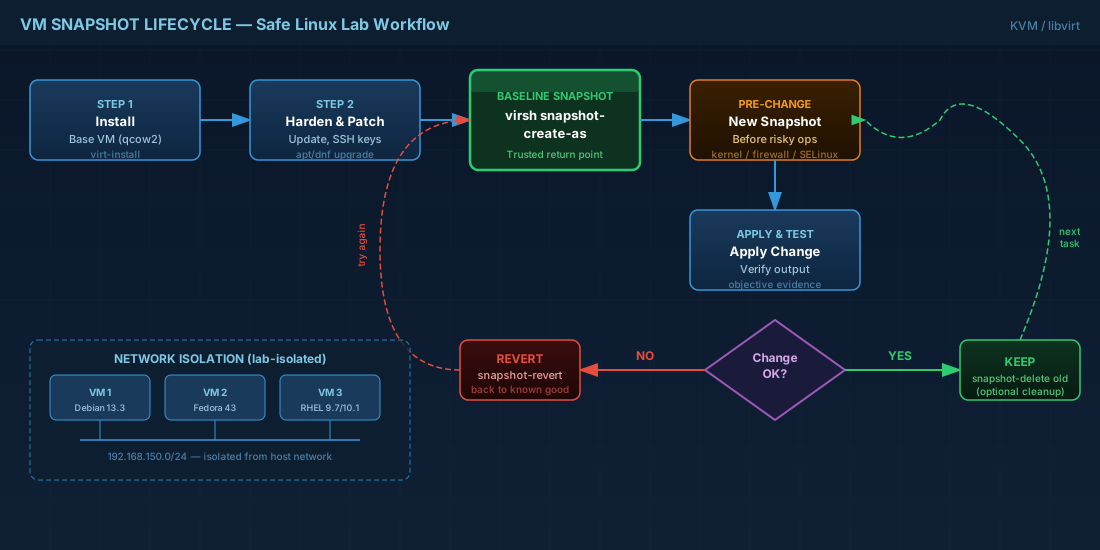
# List snapshots
virsh snapshot-list lab-debian13-base

# Revert to known good state
virsh snapshot-revert lab-debian13-base --snapshotname baseline-2026-02-26

# Optional: delete old snapshot after validating stability
virsh snapshot-delete lab-debian13-base --snapshotname pre-firewall-test
Production consequence: snapshot sprawl can fill storage quietly. If your host disk reaches high usage, all VMs are at risk. Set a cleanup habit, for example weekly review of snapshot age and size.
Another operational detail: snapshots are not backups. If the host disk fails, snapshots fail with it. Keep separate backups of critical VM images and configuration.
keep lab networking isolated by default
Many learning accidents happen on the network side. A misconfigured DHCP service or routing daemon inside a VM can disrupt your home or office network if bridged directly. For training, start isolated and open access only when needed.
# Create an isolated libvirt network definition
cat > /tmp/lab-isolated.xml <<'XML'
<network>
  <name>lab-isolated</name>
  <forward mode='none'/>
  <ip address='192.168.150.1' netmask='255.255.255.0'>
    <dhcp>
      <range start='192.168.150.100' end='192.168.150.200'/>
    </dhcp>
  </ip>
</network>
XML

virsh net-define /tmp/lab-isolated.xml
virsh net-start lab-isolated
virsh net-autostart lab-isolated
Attach test VMs to lab-isolated when practicing DNS, DHCP, firewall, or routing. This avoids accidental interference with real infrastructure.
compatibility notes for current distributions
Debian 13.3, Ubuntu 24.04.3 LTS, and Ubuntu 25.10 use similar package names and libvirt defaults. Fedora 43 and RHEL families use dnf and may ship newer virtualization stack components earlier.
RHEL 10.1 and RHEL 9.7 are both stable for KVM labs, but mixed-version environments need attention to guest tools and security policy defaults. If you clone a VM template across 9.7 and 10.1 hosts, validate:
- guest agent package compatibility
- SELinux mode and policy behavior
- network interface naming assumptions in scripts
- kernel module availability for nested or special workloads
For entry-level labs, keep one distro per template and document exact versions in each snapshot description. That practice makes troubleshooting faster later.
summary and next practice step
A safe Linux lab is more than "VMs on a laptop." It is a controlled workflow: template VM, snapshot before change, verify result, then keep or revert. That habit improves both learning speed and operational reliability.
Start with one Debian 13.3 or Ubuntu 24.04.3 LTS template, then add a Fedora 43 or RHEL 9.7/10.1 guest for cross-distro practice. Run the same admin task on each VM, note differences, and revert quickly when something breaks. That is how you build real troubleshooting skill without production risk.


