Building software from source means you compile code on your own system instead of installing a prebuilt package. Sometimes this is the right move. Sometimes it creates extra work and risk. The safe approach is to treat source builds like controlled changes, not quick experiments.
This guide is written for entry-level technicians who need real operational habits. Examples are aligned with Debian 13.3, Ubuntu 24.04.3 LTS, Ubuntu 25.10, Fedora 43, RHEL 10.1, and RHEL 9.7 compatibility notes.
Decide when a source build is justified
Use source builds for clear technical reasons:
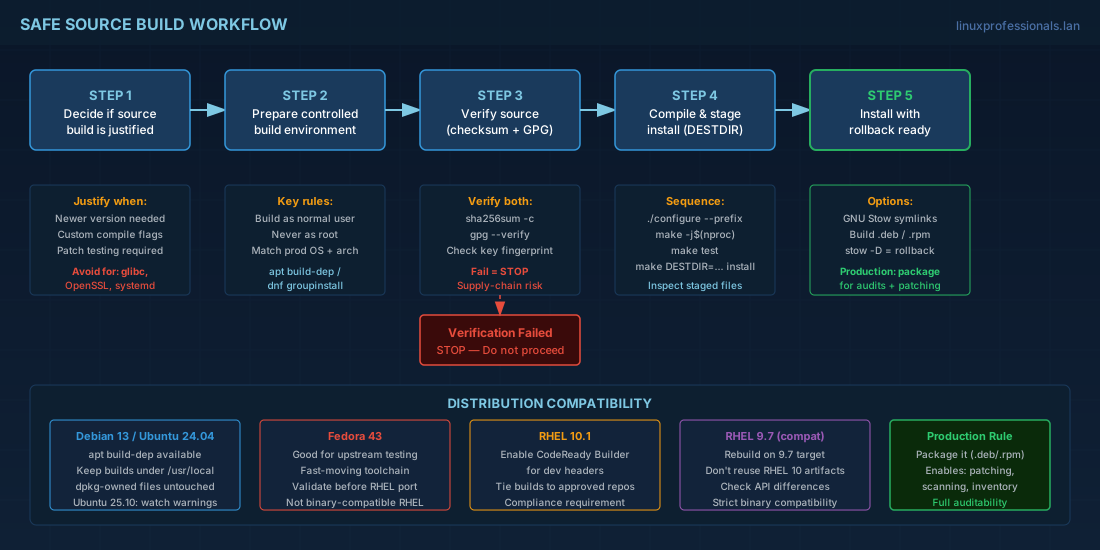
- You need a newer upstream version than your repository provides.
- You need a compile option that distro packages do not enable.
- You must test a patch before packaging it for wider deployment.
Avoid source builds for core system components unless you have strong review and rollback controls. Replacing libraries such as OpenSSL, glibc, or systemd with unmanaged files can break updates and security response workflows.
Practical consequence: beginners usually lose track of installed files. Operators then lose auditability, because package managers cannot explain who installed those files, when, and from which source.
Prepare a controlled build environment
Build as a normal user, never as root. Keep a dedicated workspace. Install only the tools you need.
# Create workspace
mkdir -p "$HOME/src-builds" && cd "$HOME/src-builds"

# Debian 13.3 / Ubuntu 24.04.3 LTS / Ubuntu 25.10
sudo apt update
sudo apt install -y build-essential pkg-config autoconf automake libtool cmake ninja-build \
  git curl ca-certificates gnupg

# Optional if package exists in apt metadata:
# sudo apt build-dep -y

# Fedora 43 / RHEL 10.1 / RHEL 9.7
sudo dnf groupinstall -y "Development Tools"
sudo dnf install -y gcc gcc-c++ make pkgconf-pkg-config autoconf automake libtool cmake ninja-build \
  git curl ca-certificates gnupg2 redhat-rpm-config

# RHEL: enable CodeReady Builder if required by dependencies
# RHEL 10.1
# sudo subscription-manager repos --enable codeready-builder-for-rhel-10-$(arch)-rpms
# RHEL 9.7
# sudo subscription-manager repos --enable codeready-builder-for-rhel-9-$(arch)-rpms
For production use, build in an environment that matches production OS and architecture. If production runs RHEL 9.7, do not compile on Fedora 43 and assume binary compatibility.
Verify the source before extraction
Source integrity checks are not optional. You need both checksum verification and signature verification when available.
# Download source + checksum + signature
curl -LO https://example.org/project-2.4.1.tar.xz
curl -LO https://example.org/project-2.4.1.sha256
curl -LO https://example.org/project-2.4.1.tar.xz.asc

# Verify checksum
sha256sum -c project-2.4.1.sha256

# Import signing key (verify fingerprint from trusted upstream docs)
gpg --keyserver keyserver.ubuntu.com --recv-keys 0xDEADBEEFCAFEBABE

# Verify detached signature
gpg --verify project-2.4.1.tar.xz.asc project-2.4.1.tar.xz
If either check fails, stop. Continuing with a failed verification is a supply-chain risk, especially on hosts with privileged access.
Compile and stage the install first
Do not copy build output straight into /. Stage files to a temporary root, inspect them, then install.
tar -xf project-2.4.1.tar.xz
cd project-2.4.1

# Configure for local software path
./configure --prefix=/usr/local

# Build
make -j"$(nproc)"

# Run tests if available
make test

# Stage install into local folder
rm -rf pkgroot
make DESTDIR="$PWD/pkgroot" install

# Review staged files before installing
find "$PWD/pkgroot" -type f | sed 's#^./##'
This staging step catches mistakes early. Example: if files unexpectedly target /usr/lib instead of /usr/local/lib, you can stop before touching the live system.
Install with rollback in mind
A safe install is reversible. Two practical options for small teams are GNU Stow under /usr/local/stow, or building native packages (.deb/.rpm) for production rollout.
# Example with GNU Stow for easy rollback
./configure --prefix=/usr/local/stow/project-2.4.1
make -j"$(nproc)"
sudo make install

# Activate symlinks into /usr/local
sudo stow -d /usr/local/stow -t /usr/local project-2.4.1

# Rollback if needed
sudo stow -D -d /usr/local/stow -t /usr/local project-2.4.1
For production fleets, prefer native packages because they integrate with patching, vulnerability scanning, and inventory tools. A single unmanaged binary on one host can become a long incident later when no one knows how it was built.
Compatibility notes for current distro targets
| Distro | Practical note |
|---|---|
| Debian 13.3 | Use apt build-dep when possible. Keep local builds under /usr/local so dpkg-owned files stay untouched. |
| Ubuntu 24.04.3 LTS | Stable base for long-lived services. Prefer reproducible build scripts and avoid one-off manual installs. |
| Ubuntu 25.10 | Newer toolchain may expose warnings or deprecated flags. Treat warning changes as build review signals, not noise. |
| Fedora 43 | Fast-moving packages are good for testing new upstream releases, but validate results before porting builds to RHEL. |
| RHEL 10.1 | Enable CodeReady Builder when required for development headers. Keep build scripts tied to approved repos for compliance. |
| RHEL 9.7 (compatibility) | Check API and compiler differences before reusing artifacts from RHEL 10.1 builds. Rebuild on 9.7 for strict compatibility. |
Conclusion
Source builds are useful when you control them like any other production change. Verify downloads, build as non-root, stage installs, and keep rollback steps ready before deployment. If software will run on many servers, package it. That single decision saves time during updates, audits, and incident response.


