Backups fail most often when teams focus only on copy speed and skip recovery testing. A backup is useful only if you can restore the right data, to the right place, within your service target time. For entry-level technicians, that means learning three tools with different jobs: rsync for fast file copies, restic for encrypted versioned backups, and filesystem or volume snapshots for fast rollback.
These methods are not interchangeable. If you use each one for the right problem, you reduce downtime and avoid the common production mistake of having "a backup" that does not meet recovery needs.
Start with recovery goals, not commands
Before writing any script, define two numbers with your team:
RPO(Recovery Point Objective): how much data loss is acceptable, such as 15 minutes or 24 hours.RTO(Recovery Time Objective): how long service can stay down, such as 30 minutes or 4 hours.
Production consequence: if your RPO is 15 minutes but you run backups once per day, your plan already misses the target. If your RTO is 30 minutes but your restore process takes 2 hours, the process is not production-ready even if backup files exist.
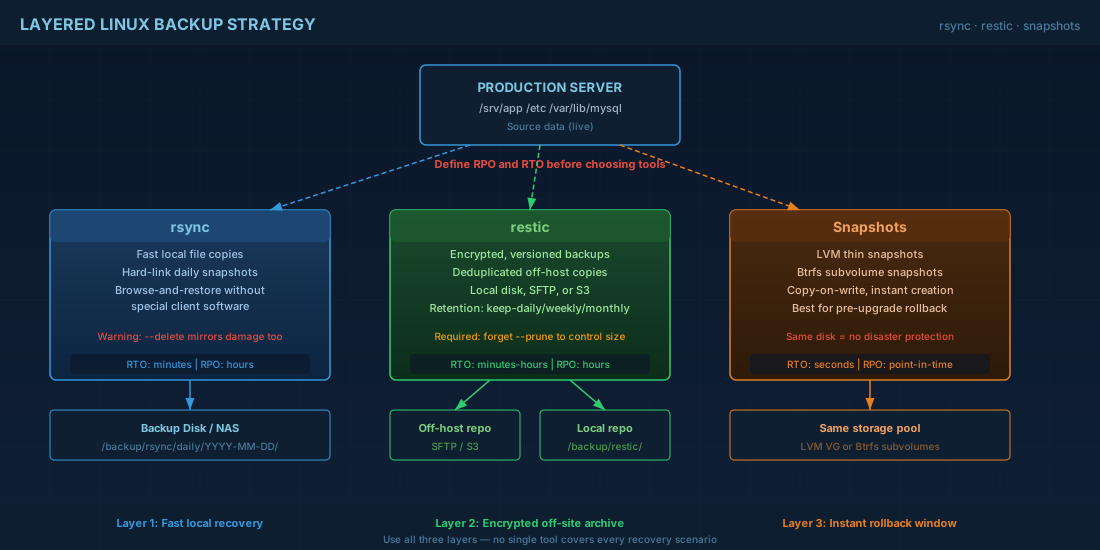
For beginners, this changes how you think about tooling. rsync is often good for fast local recovery. restic is better for long-term, encrypted, off-host copies. Snapshots are best for short rollback windows. Good operations use all three in layers.
rsync for fast local copies and staged recovery
rsync is simple and reliable for copying directories between disks or hosts. It is often the fastest way to rebuild a broken config tree or restore application files from a nearby backup server.
# Example: nightly mirror of /srv/app to a backup disk
# --numeric-ids keeps uid/gid stable across systems
# --delete-during removes files deleted on source
sudo rsync -aHAX --numeric-ids --delete-during \
  /srv/app/ /backup/local/app-mirror/

# Log the result for incident review
echo "$(date '+%F %T') rsync app mirror done" | sudo tee -a /var/log/backup-rsync.log
Use rsync carefully with --delete options. If source data is damaged or encrypted by ransomware, rsync can copy the bad state. Keep at least one immutable or versioned copy elsewhere.
You can also create space-efficient, hard-link based daily points:
# Daily rsync snapshot tree with --link-dest
# Yesterday's snapshot provides unchanged files as hard links
TODAY=$(date +%F)
YESTERDAY=$(date -d 'yesterday' +%F)
DEST=/backup/rsync/daily/$TODAY
PREV=/backup/rsync/daily/$YESTERDAY

sudo mkdir -p "$DEST"
sudo rsync -aHAX --delete-during \
  --link-dest="$PREV" \
  /srv/app/ "$DEST"
For operators, this pattern gives quick browse-and-copy restores without special client software. For beginners, the main rule is to test a real restore path, not only the backup command.
restic for encrypted, versioned, off-host backups
restic stores deduplicated snapshots in a repository and encrypts data before writing. It works with local disks, SFTP, and object storage such as S3-compatible targets. This is useful when you need retention history and safer copies outside the main server.
# Install examples
# Debian 13.3, Ubuntu 24.04.3 LTS, Ubuntu 25.10
sudo apt update && sudo apt install -y restic

# Fedora 43, RHEL 10.1, RHEL 9.7
sudo dnf install -y restic
# Initialize repository on a mounted backup volume
export RESTIC_REPOSITORY=/backup/restic/repo
export RESTIC_PASSWORD_FILE=/root/.restic-pass
sudo sh -c 'umask 077; echo "replace-with-strong-passphrase" > /root/.restic-pass'
sudo restic init
# Backup important paths
sudo restic backup /etc /srv/app /var/lib/mysql
# Retention policy: keep recent and monthly recovery points
sudo restic forget --prune \
--keep-daily 7 --keep-weekly 4 --keep-monthly 6
# Integrity check (run from cron/systemd timer weekly)
sudo restic checkProduction consequence: encrypted off-host copies reduce blast radius when the main host is lost or compromised. Without retention cleanup (forget --prune), repository size can grow until backups fail for lack of space.
For database workloads, avoid file-level backup during heavy writes unless you use database-aware dumps or snapshot-consistent methods. A copied file is not always a consistent transaction state.
Snapshots for quick rollback, not long-term history
Snapshots are fast because they track block or file changes using copy-on-write. They are excellent for short rollback windows before package upgrades or configuration migrations.
# LVM thin snapshot example before risky change
sudo lvcreate -L 5G -s -n root-pre-upgrade /dev/vg0/root

# Perform package upgrade or config migration
sudo dnf upgrade -y

# If rollback needed, boot to rescue and merge snapshot workflow
# (exact rollback steps depend on your LVM layout and boot policy)
# Btrfs snapshot example
sudo btrfs subvolume snapshot -r / /@root-pre-upgrade-$(date +%F)
# List snapshots
sudo btrfs subvolume list /Important limit: snapshots usually live on the same storage system as the source data. If the disk fails, both source and snapshot can be lost. That is why snapshots do not replace off-host backups.
For beginners: use snapshots as "undo" for recent changes. For operators: combine snapshots with replicated or off-site backups to meet disaster recovery goals.
Restore workflow that works under pressure
A restore runbook should be short and executable by someone who did not write the backup script. Keep it in version control and test it after major distro upgrades.
# Example: restore one directory from restic latest snapshot
export RESTIC_REPOSITORY=/backup/restic/repo
export RESTIC_PASSWORD_FILE=/root/.restic-pass

sudo restic snapshots
sudo restic restore latest --target /tmp/restore-test --include /srv/app/config

# Compare restored files with expected ownership and permissions
sudo rsync -an --delete /tmp/restore-test/srv/app/config/ /srv/app/config/
Then validate service behavior, not just file presence:
# Example service checks after restore
sudo systemctl restart app.service
sudo systemctl is-active app.service
curl -fsS http://127.0.0.1:8080/healthz
Production consequence: many incidents are extended because teams restore files but forget dependent secrets, SELinux contexts, systemd overrides, or database grants. Add these checks to the runbook so recovery is repeatable.
Compatibility notes for Debian, Ubuntu, Fedora, and RHEL
| Distribution | Package path | Operational note |
|---|---|---|
| Debian 13.3 | apt install rsync restic |
Good fit for systemd timers plus rsync/restic scripts in /usr/local/sbin. |
| Ubuntu 24.04.3 LTS | apt install rsync restic |
Use LTS for longer support windows on backup servers. |
| Ubuntu 25.10 | apt install rsync restic |
Shorter lifecycle than LTS; review backup client updates more often. |
| Fedora 43 | dnf install rsync restic |
Fast package cadence; validate restore flow after major upgrades. |
| RHEL 10.1 | dnf install rsync restic |
Align retention and restore testing with change-control windows. |
| RHEL 9.7 compatibility | dnf install rsync restic |
Commands in this article are compatible with typical RHEL 9.7 baselines. |
Conclusion
A practical Linux backup design is layered. Use rsync for fast local copies, restic for encrypted versioned off-host backups, and snapshots for short rollback windows. Define RPO and RTO first, then test restore steps until another technician can run them under incident pressure. If you do that, backups stop being a checkbox and become a reliable recovery system for real production outages.


