Standard Linux permissions use owner, group, and other (rwx bits). That model is fast and simple, but it breaks down when real teams share the same folders. Access Control Lists (ACLs) and special permission bits solve that gap. If you manage shared data, these tools are not optional.
This guide uses beginner-friendly language, but it stays production-focused. You will learn what to configure, what can go wrong, and how to verify that your access rules really work.
Why basic rwx bits stop working in shared environments
With classic permissions, a file can have only one owning group. That is often too limited. Example: a project folder needs write access for developers, read-only access for QA, and read access for a backup account. One group cannot express all three needs safely.
Many new admins react by running wide commands like chmod -R 777. That usually fixes access errors for a few minutes, then creates a security incident later. ACLs let you solve the real requirement without exposing everything.
# Base permissions: owner and group can access, others cannot
sudo chown -R root:devops /srv/projects/app1
sudo chmod -R 770 /srv/projects/app1

# Add ACL entries for extra users/groups
sudo setfacl -Rm u:backupsvc:rx /srv/projects/app1
sudo setfacl -Rm g:qa:rx /srv/projects/app1

# Verify effective rights
getfacl /srv/projects/app1
Production consequence: when ACLs are missing, teams often over-permit entire trees to keep work moving. Over time, that makes data leaks and accidental changes much more likely.
Reading and setting ACLs without surprises
Two commands matter most: getfacl reads ACL entries and setfacl writes them. The common entries are:
u:name:rwxfor a named userg:name:rwxfor a named groupm:rwxfor the ACL mask (the maximum allowed for named users/groups)o:rwxfor everyone else
The mask is the part many beginners miss. If the mask is r-x, a group entry with rwx still behaves as r-x. Always check the effective permissions in getfacl output.
# Grant alice full access and qa group read/execute
sudo setfacl -m u:alice:rwx,g:qa:rx /srv/projects/app1

# Set a restrictive mask that limits named entries
sudo setfacl -m m:rx /srv/projects/app1

# Show result (notice "effective" values)
getfacl /srv/projects/app1

# Remove one ACL entry cleanly
sudo setfacl -x u:alice /srv/projects/app1
Production consequence: a wrong mask causes "it works for some users but not others" tickets that are hard to debug unless your team checks ACLs first.
Default ACLs and setgid directories for team workflows
Normal ACL entries apply to existing files. Default ACL entries apply to new files and folders created inside a directory. This is the safest way to keep shared project permissions consistent.
Use default ACLs together with the setgid bit on the directory. Setgid makes new files inherit the parent group, so ownership does not drift.
# Shared directory for operations team
sudo mkdir -p /srv/shared/reports
sudo chown root:ops /srv/shared/reports

# 2 in 2770 enables setgid on directory
sudo chmod 2770 /srv/shared/reports

# Access ACL for current directory
sudo setfacl -m g:ops:rwx /srv/shared/reports

# Default ACL for future content
sudo setfacl -m d:g:ops:rwx,d:o:--- /srv/shared/reports

# Validate both normal and default ACL entries
getfacl /srv/shared/reports
Also remember umask. If users run with a very restrictive umask, default ACLs still help, but testing is important. Create sample files as different users and confirm actual results before rollout.
Special permissions: setuid, setgid, and sticky bit
Special bits are older than ACLs but still essential.
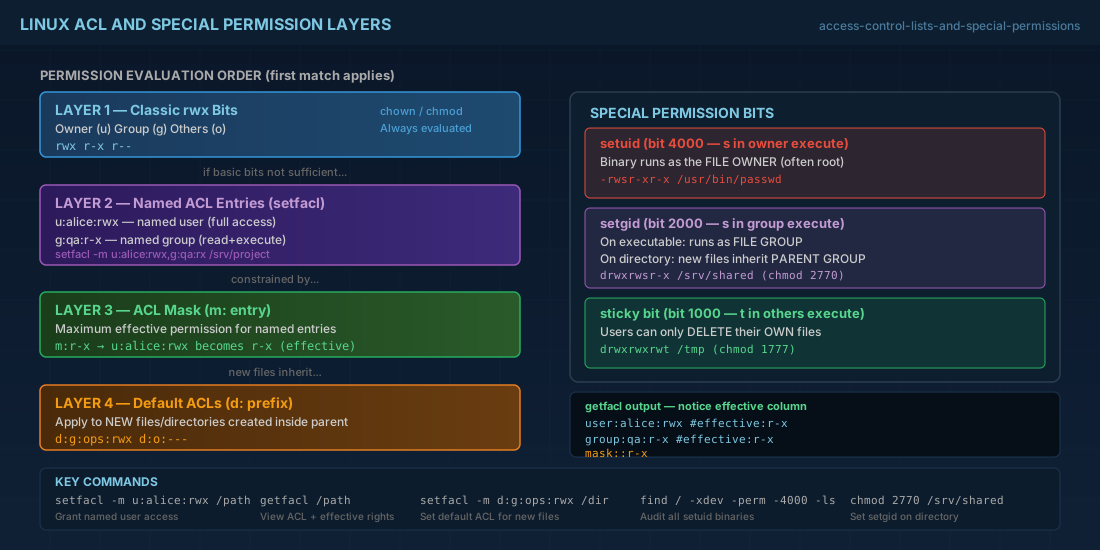
setuidon an executable makes the process run as the file owner (often root).setgidon an executable runs as the file group; on a directory it enforces group inheritance.sticky biton a directory lets users delete only their own files (common on/tmp).
These bits are powerful. A wrong setuid binary can become a privilege escalation path, so keep the list short and audited.
# Audit setuid and setgid files on one filesystem
sudo find / -xdev -type f \( -perm -4000 -o -perm -2000 \) -ls 2>/dev/null

# Correct sticky bit on a public temp directory
sudo chmod 1777 /shared/tmp

# Example: setgid directory for team-owned files
sudo chmod 2775 /srv/shared/deploy

# Display special bits (s and t markers)
ls -ld /shared/tmp /srv/shared/deploy
Do not rely on setuid shell scripts for privilege control. Modern Linux systems treat this as unsafe, and behavior is intentionally restricted. Use audited binaries or sudo rules instead.
Compatibility notes for current distributions
For Debian 13.3, Ubuntu 24.04.3 LTS, Ubuntu 25.10, Fedora 43, RHEL 10.1, and RHEL 9.7, the kernel side of POSIX ACL support is standard on ext4 and XFS. The common issue is missing userland tools on minimal installs.
# Debian 13.3 / Ubuntu 24.04.3 LTS / Ubuntu 25.10
sudo apt update
sudo apt install -y acl

# Fedora 43 / RHEL 10.1 / RHEL 9.7
sudo dnf install -y acl

# Confirm tools are present
getfacl --version
setfacl --version

# Check mount options on target path
findmnt -no TARGET,FSTYPE,OPTIONS /srv/shared| Platform | Package tool | Notes |
|---|---|---|
| Debian 13.3 | apt | Install acl on minimal images before using setfacl. |
| Ubuntu 24.04.3 LTS / 25.10 | apt | Same commands as Debian; verify ACL behavior on cloud images. |
| Fedora 43 | dnf | XFS defaults are ACL-friendly; still validate with getfacl. |
| RHEL 10.1 / 9.7 | dnf | Commands are compatible between 10.1 and 9.7 for POSIX ACL management. |
If you use NFS or SMB shares, confirm ACL model compatibility. POSIX ACLs and NFSv4 ACLs are related but not identical. Test with real client accounts before production rollout.
Backup and audit checklist
ACL changes are metadata. If backups ignore that metadata, restore operations silently weaken your security design.
# Export ACLs for recovery documentation
sudo getfacl -R /srv/shared > /root/acl-snapshot-2026-02-26.txt

# Archive while preserving ACLs and xattrs
sudo tar --acls --xattrs -cpf /backup/shared-acl.tar /srv/shared

# Rsync with ACL and xattr preservation
sudo rsync -aAX --delete /srv/shared/ /backup/shared/

# Quick drift check: list files with ACL marker (+)
find /srv/shared -maxdepth 3 -printf '%M %u:%g %p\n' | grep '+' || true
For beginners: document every ACL policy in plain language. For operators: add ACL checks to incident runbooks and post-deploy validation. That prevents midnight outages caused by hidden permission drift.
Summary
ACLs add precision when Linux rwx bits are not enough. Default ACLs plus setgid directories keep team access consistent for new files. Special bits (setuid, setgid, sticky) still matter, but they need regular auditing. On Debian 13.3, Ubuntu 24.04.3 LTS and 25.10, Fedora 43, and RHEL 10.1 with RHEL 9.7 compatibility, the workflow is mostly the same: install tools, apply policy, verify with getfacl, and preserve ACL metadata in backups.


