The Raspberry Pi 5 is a big step up from the Pi 4. New SoC, a custom RP1 southbridge chip, PCIe connectivity. It is closer to a real computing platform than any previous Pi. So of course people want to run Red Hat Enterprise Linux on it. The short answer: you cannot run genuine RHEL on a Pi 5 today, and the reasons are architectural, not political.
This article explains exactly why, what the blocking issues are, when the situation might change, and what you can run right now to get a RHEL-compatible experience on Pi 5 hardware. It also covers WiFi in detail because the Pi 5 uses the same Infineon CYW43455 chip as the Pi 4, which means WiFi is actually one of the easier problems to solve once you have a working kernel.
Why RHEL Cannot Run on Raspberry Pi 5
Three technical barriers prevent RHEL from running on Pi 5 hardware. Understanding them matters because they are not the same barriers you face on Pi 4.
Barrier 1: Kernel Version Gap
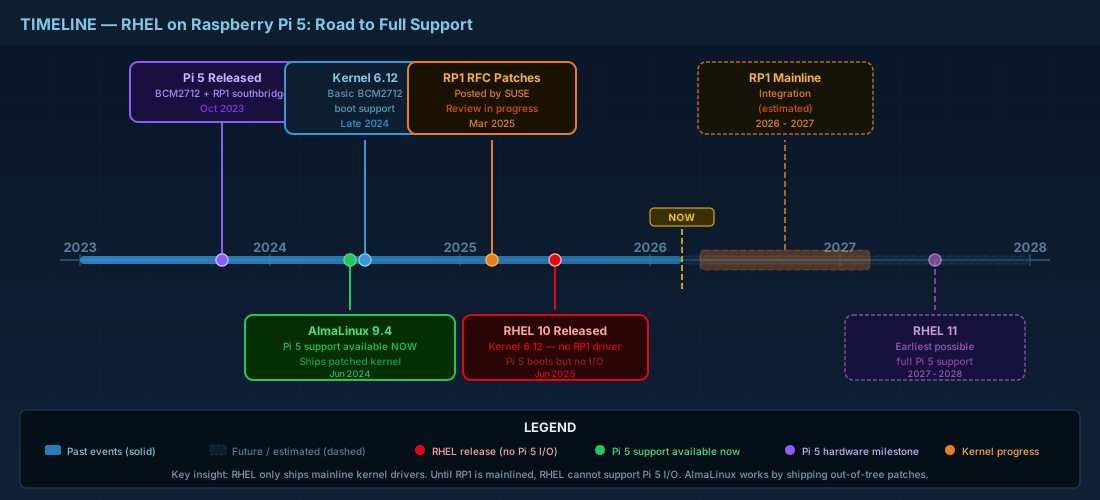
RHEL 9 ships with kernel 5.14. The Broadcom BCM2712 SoC in the Pi 5 received initial boot support in mainline Linux 6.12. The BCM2712 device tree files appeared in kernel 6.19-rc1. RHEL 9's kernel is simply too old to contain any BCM2712 support. The system will not boot, period.
RHEL 10 ships with kernel 6.12 LTS, which has basic BCM2712 support. For a breakdown of what each RHEL release changes, see our RHEL version comparison from RHEL 6 through 10. Red Hat has not released Pi 5 images and has not indicated plans to support Pi hardware in any RHEL version.
Barrier 2: The RP1 Southbridge Problem
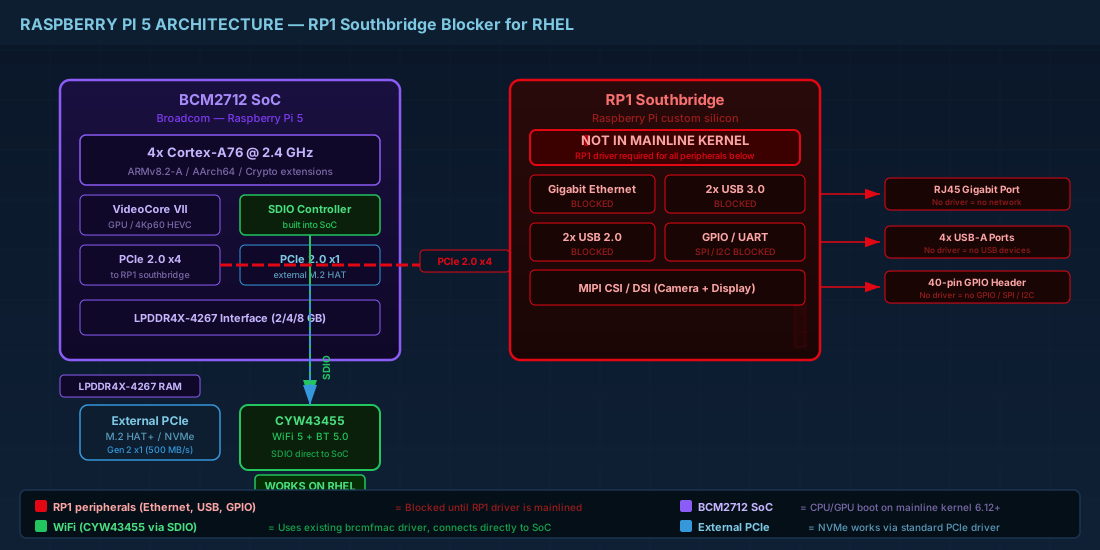
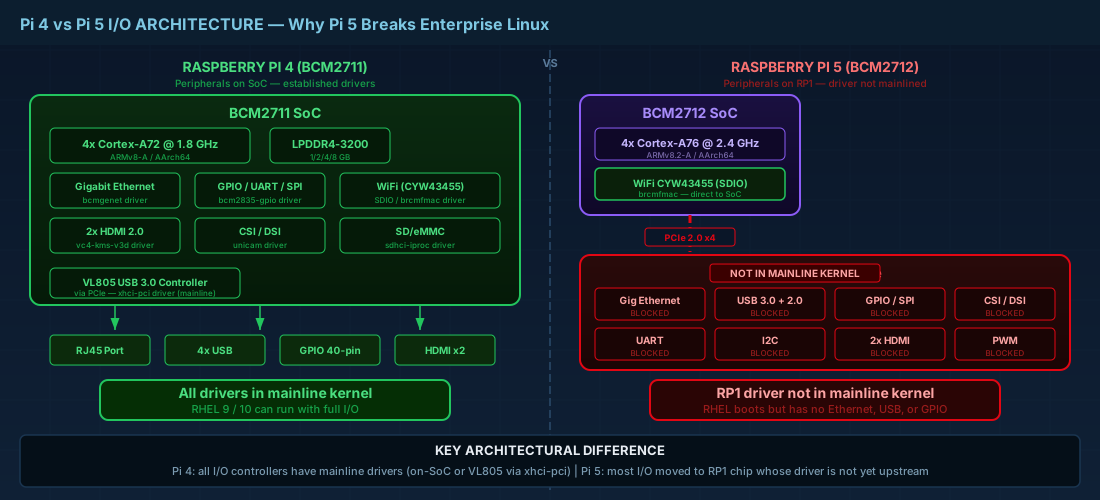
The Pi 5 introduced a custom I/O controller chip called RP1, designed by Raspberry Pi Ltd. This single chip handles almost all the Pi 5's peripherals: Gigabit Ethernet, two USB 3.0 ports, two USB 2.0 ports, GPIO, SPI, I2C, UART, camera and display interfaces, and analog video output. The RP1 connects to the BCM2712 SoC via a 4-lane PCIe 2.0 link.
The RP1 driver exists only in Raspberry Pi's downstream kernel fork. Upstream mainlining is in progress: SUSE engineer Andrea della Porta posted an RFC (request for comments) patch series in March 2025, but the Raspberry Pi Foundation acknowledged this "is going to take quite a long time" to complete. Without the RP1 driver, a Pi 5 running a stock RHEL kernel would have:
- No Ethernet
- No USB 3.0 or USB 2.0 (except USB-C OTG via the dwc2 controller)
- No GPIO
- No camera or display interfaces
- No analog video output
This is the single biggest blocker. On Pi 4, the SoC handled most peripherals directly through well-established Linux drivers. On Pi 5, nearly everything goes through the RP1 chip, and that driver stack does not exist in any mainline or RHEL kernel.
Barrier 3: PCIe Controller Support
The BCM2712's PCIe controller (which connects to both the RP1 and the external PCIe connector on Pi 5) is not fully upstreamed in the mainline kernel as of early 2025. These patches are a prerequisite for RP1 support. Even RHEL 10's kernel 6.12 may not include the necessary PCIe patches for BCM2712.
RHEL compatibility: Pi 4 vs. Pi 5
| Aspect | Pi 4 (BCM2711) | Pi 5 (BCM2712) |
|---|---|---|
| RHEL installable? | Yes, via UEFI (community tested) | No (kernel lacks BCM2712 support) |
| SoC kernel support | BCM2711 in mainline since kernel ~5.4 | BCM2712 partial from kernel 6.12+ |
| I/O architecture | Peripherals on the SoC directly | Peripherals on RP1 (via PCIe) |
| Ethernet | Via VL805 USB 3.0 bridge (established driver) | Via RP1 (requires RP1 driver) |
| USB | VIA VL805 controller (PCIe, established driver) | Via RP1 (requires RP1 driver) |
| WiFi chip | CYW43455 via SDIO | CYW43455 via SDIO (same chip) |
| WiFi connection path | SDIO to BCM2711 SoC | SDIO directly to BCM2712 SoC (not through RP1) |
| Community RHEL success | Multiple reports of RHEL 9 working | No reports of RHEL working |
The fundamental difference is architectural. Pi 4 keeps most peripherals on or close to the SoC, with drivers that have been in the mainline kernel since before RHEL 9 was released. For the full Pi 4 walkthrough including WiFi, see our RHEL on Raspberry Pi 4 guide. Pi 5 moves nearly everything behind the RP1 chip, which requires an entirely new driver stack that is still being developed upstream.
Raspberry Pi 5 WiFi: the CYW43455 driver and firmware
The funny part: WiFi is one of the easier hardware problems on Pi 5. The WiFi chip connects directly to the BCM2712 SoC via SDIO, bypassing the RP1 southbridge entirely.
Same Chip, Same Driver
Both Pi 4 and Pi 5 use the identical Infineon CYW43455 WiFi chip. The Linux driver is the same brcmfmac FullMAC module, loaded via modprobe like any other kernel module. The firmware binary (brcmfmac43455-sdio.bin) and the regulatory blob (brcmfmac43455-sdio.clm_blob) are the same files.
The only difference is the board-specific NVRAM configuration file. Pi 4 uses:
brcmfmac43455-sdio.raspberrypi,4-model-b.txtPi 5 uses:
brcmfmac43455-sdio.raspberrypi,5-model-b.txtThese files contain board-specific radio parameters: antenna configuration, power limits, and MAC address templates. The Pi 5 NVRAM file is available in the RPi-Distro/firmware-nonfree repository on GitHub.
Performance Improvement on Pi 5
Same chip, but faster WiFi. The Pi 5's SDIO interface runs in DDR50 mode, roughly doubling the bus throughput compared to the Pi 4's SDR mode. Tom's Hardware measured about 3x faster WiFi on the Pi 5 under the same conditions. On Pi 4, the bus was the bottleneck, not the chip. Pi 5 removed that bottleneck.
WiFi Firmware Files for Pi 5
| File | Purpose | Same as Pi 4? |
|---|---|---|
brcmfmac43455-sdio.bin | Main firmware binary | Yes |
brcmfmac43455-sdio.clm_blob | Regulatory data | Yes |
brcmfmac43455-sdio.raspberrypi,5-model-b.txt | Pi 5 board-specific NVRAM | No (Pi 5 specific) |
The Pi 5 NVRAM file is not included in the standard linux-firmware RPM package. On any RHEL-compatible distribution running on Pi 5, you would need to obtain it from the Raspberry Pi firmware repository and place it in /lib/firmware/brcm/.
What You Can Run Instead: RHEL-Compatible Alternatives
If you want the RHEL package ecosystem on Raspberry Pi 5 hardware today, your options are distributions that ship custom Pi-patched kernels while maintaining binary compatibility with RHEL packages.
AlmaLinux 9.4+ (Recommended)
AlmaLinux officially supports Pi 5 since version 9.4, released in June 2024. It ships a custom kernel with all the necessary BCM2712, RP1, and PCIe patches backported from the Raspberry Pi downstream kernel. WiFi works via NetworkManager.
# AlmaLinux on Pi 5: WiFi setup
nmcli radio wifi on
nmcli dev wifi list
nmcli dev wifi connect "YourSSID" password "YourPassword"

# Verify
nmcli device status
ip addr show wlan0
AlmaLinux provides pre-built disk images (both MBR and GPT since mid-2024) that you flash directly to a microSD card or USB SSD. Everything works out of the box: Ethernet, USB, WiFi, HDMI, and the PCIe connector.
Rocky Linux
Rocky Linux provides community images for Pi 5 starting with Rocky 9. WiFi firmware is included. The support is less formal than AlmaLinux's dedicated Pi images, but it works.
Fedora
Fedora does not yet officially support Pi 5 as of early 2025. The Fedora ARM maintainer stated that official support is waiting on sufficient upstream kernel support, particularly for the RP1 driver. Reassessment was planned after the kernel 6.14 merge window, potentially for Fedora 42. Unofficial Fedora images for Pi 5 are available through COPR repositories.
WiFi Setup on AlmaLinux Pi 5 (Full Walkthrough)
Since AlmaLinux is the best RHEL-compatible option for Pi 5, here is the complete WiFi setup. It is much simpler than the RHEL-on-Pi-4 process because AlmaLinux ships with the correct kernel and firmware already in place.
Step 1: Flash the Image
# Download AlmaLinux 9 Raspberry Pi image
# From: https://wiki.almalinux.org/documentation/raspberry-pi.html

# Flash to SD card or USB SSD
sudo dd if=AlmaLinux-9-RaspberryPi-latest-aarch64.img of=/dev/sdX bs=4M status=progress conv=fsync
Step 2: First Boot and Package Update
# Default credentials vary by image version
# Typically: almalinux/almalinux or root/almalinux

# Update packages
sudo dnf update -y

# Install WiFi packages if not already present
sudo dnf install -y NetworkManager-wifi wpa_supplicant wireless-regdb
Step 3: Verify WiFi Hardware Detection
# Check that the brcmfmac driver loaded correctly
dmesg | grep -i brcmfmac
# Expected output includes:
# brcmfmac: brcmf_fw_alloc_request: using brcm/brcmfmac43455-sdio for chip BCM4345/6

# Verify wlan0 exists
ip link show wlan0

# Check WiFi radio status
nmcli radio wifi
# Should show: enabled
Step 4: Connect to WiFi
# Scan available networks
nmcli dev wifi list

# Connect (WPA2-PSK)
nmcli dev wifi connect "YourNetwork" password "YourPassword"

# For hidden networks
nmcli dev wifi connect "HiddenSSID" password "YourPassword" hidden yes

# Verify connection
nmcli connection show --active
ip addr show wlan0
ping -c 4 1.1.1.1
Step 5: Set Regulatory Domain
# Set your country for correct channel/power limits
sudo iw reg set IE

# Make persistent
echo 'COUNTRY=IE' | sudo tee /etc/sysconfig/regdomain
Troubleshooting WiFi on Pi 5
Most WiFi problems on Pi 5 with AlmaLinux are simpler than on Pi 4 with RHEL, because AlmaLinux ships a Pi-patched kernel that handles the SDIO timing correctly. The driver reload workaround from Pi 4 is usually not needed. If WiFi still fails:
# Check firmware files
ls -la /lib/firmware/brcm/brcmfmac43455-sdio*

# If the Pi 5 NVRAM file is missing, download it
sudo curl -L -o "/lib/firmware/brcm/brcmfmac43455-sdio.raspberrypi,5-model-b.txt" \
  "https://raw.githubusercontent.com/RPi-Distro/firmware-nonfree/master/debian/config/brcm80211/brcm/brcmfmac43455-sdio.raspberrypi%2C5-model-b.txt"

# Reload the driver
sudo modprobe -r brcmfmac && sleep 2 && sudo modprobe brcmfmac

# Check for rfkill blocks
rfkill list all
sudo rfkill unblock wifi
RHEL on Pi 5: when will it be possible?
Three things need to happen before genuine RHEL can boot on Pi 5:
- RP1 driver upstreaming must complete. The RFC patches from March 2025 are a start, but full integration into the mainline kernel is months to years away. The Raspberry Pi Foundation's own estimate: "quite a long time."
- BCM2712 PCIe controller patches must be merged. These are a prerequisite for RP1 support since RP1 sits behind PCIe.
- A RHEL version must ship a kernel containing all of the above. Even if mainline kernel 6.19 or 7.0 includes full Pi 5 support, RHEL rebases kernels only on major releases. RHEL 11 (no release date announced) would be the earliest candidate.
Realistically, RHEL on Pi 5 without kernel modifications is a 2027-2028 possibility at the earliest. If you need something sooner, use AlmaLinux with its Pi-patched kernel.
Pi 5 Hardware Overview for RHEL Administrators
| Component | Detail |
|---|---|
| SoC | Broadcom BCM2712, quad-core Cortex-A76 at 2.4 GHz (ARMv8.2-A) |
| RAM | 4 GB or 8 GB LPDDR4X-4267 |
| I/O controller | RP1 southbridge (connected via 4-lane PCIe 2.0) |
| External PCIe | 1x PCIe 2.0 (via FPC connector, supports NVMe with HAT+) |
| WiFi | Infineon CYW43455, 802.11ac dual-band, SDIO to SoC (not RP1) |
| Bluetooth | 5.0 + BLE (same CYW43455 chip, UART to SoC) |
| Ethernet | Gigabit via RP1 |
| USB | 2x USB 3.0 + 2x USB 2.0 via RP1 |
| Power | 5V/5A USB-C (USB PD supported) |
Quick Reference - Cheats
| Task | Command / Info |
|---|---|
| Best RHEL-compatible OS for Pi 5 | AlmaLinux 9.4+ (official Pi 5 images) |
| WiFi driver | brcmfmac (same as Pi 4) |
| WiFi chip | Infineon CYW43455 (same as Pi 4) |
| Pi 5 NVRAM firmware file | brcmfmac43455-sdio.raspberrypi,5-model-b.txt |
| Connect to WiFi | nmcli dev wifi connect "SSID" password "PASS" |
| Set regulatory domain | iw reg set IE |
| Why RHEL won't boot on Pi 5 | No BCM2712/RP1 support in RHEL 9 kernel 5.14 |
| Earliest possible RHEL support | RHEL 11 (estimated 2027-2028) |
Frequently Asked Questions
Can I install RHEL on Raspberry Pi 5?
No, not as of early 2026. RHEL 9's kernel 5.14 does not include BCM2712 SoC support, and the RP1 southbridge driver (which handles Ethernet, USB, and GPIO on Pi 5) has not been merged into the mainline kernel. Without both, RHEL cannot boot on Pi 5 hardware. RHEL 10 ships kernel 6.12 with partial BCM2712 support, but still lacks the RP1 driver. The earliest realistic RHEL version for Pi 5 is RHEL 11, estimated around 2027-2028.
Does the Raspberry Pi 5 use the same WiFi chip as the Pi 4?
Yes. Both Pi 4 and Pi 5 use the Infineon CYW43455 WiFi chip. The driver (brcmfmac) and main firmware binary are identical. The only difference is the board-specific NVRAM file: Pi 4 uses brcmfmac43455-sdio.raspberrypi,4-model-b.txt and Pi 5 uses brcmfmac43455-sdio.raspberrypi,5-model-b.txt. Pi 5 gets faster WiFi throughput because its SDIO interface runs in DDR50 mode, roughly doubling the bus speed.
What is the best RHEL-compatible distribution for Raspberry Pi 5?
AlmaLinux 9.4 or newer. AlmaLinux provides official Raspberry Pi 5 images with a custom kernel that includes BCM2712, RP1, and PCIe support backported from the Pi downstream kernel. It is binary-compatible with RHEL packages, meaning all RHEL repositories and RPMs work. WiFi, Ethernet, USB, HDMI, and the PCIe connector all work out of the box. Rocky Linux also offers community Pi 5 images.
What is the RP1 chip and why does it block RHEL on Pi 5?
The RP1 is a custom I/O controller chip designed by Raspberry Pi Ltd. On the Pi 5, it handles Gigabit Ethernet, USB 3.0, USB 2.0, GPIO, SPI, I2C, UART, and display interfaces. It connects to the BCM2712 SoC via a 4-lane PCIe 2.0 link. The RP1 driver exists only in the Raspberry Pi downstream kernel fork. Upstream mainlining started with an RFC patch series in March 2025, but the Raspberry Pi Foundation acknowledged the process will take a long time. Without the RP1 driver, a Pi 5 running a stock kernel has no Ethernet, no USB, and no GPIO.
Summary
Red Hat Enterprise Linux cannot run on the Raspberry Pi 5 today. The BCM2712 SoC is too new for RHEL 9's kernel, and the RP1 southbridge driver that handles Ethernet, USB, and GPIO is not in the mainline kernel yet. WiFi is the exception: the CYW43455 chip connects directly to the SoC via SDIO and uses the same brcmfmac driver and firmware as Pi 4. Once a compatible kernel exists, WiFi will be the easiest peripheral to enable.
For a RHEL-compatible experience on Pi 5 right now, AlmaLinux 9.4 or newer is the practical choice. It ships official Pi 5 images with a custom kernel that supports all Pi 5 hardware, while maintaining binary compatibility with RHEL packages. WiFi setup takes one nmcli command. When the RP1 driver eventually reaches the mainline kernel, genuine RHEL on Pi 5 becomes possible, likely on the RHEL 11 timeline.