New Linux technicians often hear "use containers" and "use virtual machines" as if they are the same tool. They are not. Containers package an application and its user-space dependencies, but they still use the host kernel. Virtual machines run a full guest OS with its own kernel through a hypervisor such as KVM. If you choose the wrong tool, you can get weak isolation, slow deployment, or hard-to-debug networking problems in production.
This article explains the basics with Podman for containers and KVM for virtualization. The examples are practical for lab and small production environments, and the compatibility notes map to Debian 13.3, Ubuntu 24.04.3 LTS, Ubuntu 25.10, Fedora 43, RHEL 10.1, and RHEL 9.7.
containers and virtual machines solve different problems
A container shares the host kernel, so it starts fast and uses less memory. This is great for stateless services, CI jobs, short-lived tasks, and predictable app deployments. Podman is popular in operations teams because it runs daemonless and supports rootless mode, which lowers risk for day-to-day admin work.
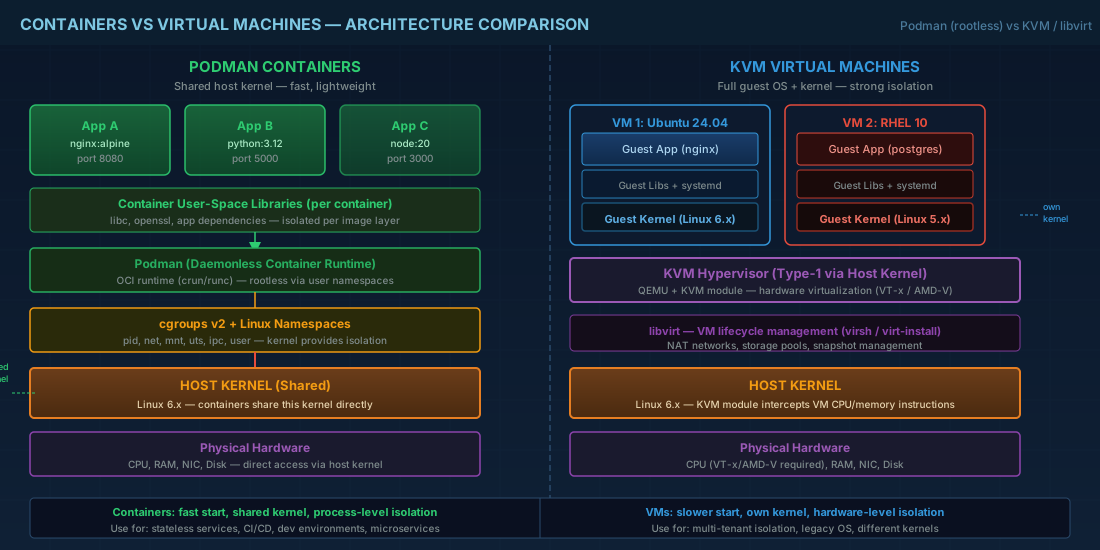
A KVM virtual machine emulates hardware and boots a full OS. It starts slower than a container and uses more disk and RAM, but you get stronger isolation boundaries and can run different kernels on one host. This matters when teams need mixed operating systems, strict security separation, or legacy software that expects full system behavior.
Production consequence: if you put multi-tenant untrusted workloads in containers without the right controls, a host-kernel issue can affect all tenants. If you put every tiny helper service in a VM, your host density drops and patching overhead rises. Most real environments use both: containers for app packaging, VMs for isolation domains.
host readiness checks before installation
Before installing anything, confirm CPU virtualization support and current kernel mode. KVM needs hardware virtualization flags. Containers need cgroups and namespaces, which modern distros already provide by default.
# Check CPU virtualization support (vmx = Intel VT-x, svm = AMD-V)
egrep -c '(vmx|svm)' /proc/cpuinfo

# Show virtualization-related lines
lscpu | grep -E 'Virtualization|Hypervisor'

# KVM device should exist after kvm modules load
ls -l /dev/kvm

# Check if user can manage libvirt VMs (group membership often needed)
id
If /dev/kvm is missing, KVM guests usually fall back to software emulation and performance drops hard. In cloud environments, this can also mean nested virtualization is disabled by the provider. Validate this before promising VM performance numbers.
first podman workflow for application containers
Start with a simple rootless container. Rootless Podman helps beginners avoid running everything as root and reduces blast radius from mistakes.
# Debian/Ubuntu
sudo apt update
sudo apt install -y podman uidmap

# Fedora/RHEL
sudo dnf install -y podman

# Run a temporary web container as your normal user
podman run -d --name webdemo -p 8080:80 docker.io/library/nginx:alpine
podman ps
curl -I http://127.0.0.1:8080

# Persist container startup in user systemd
podman generate systemd --name webdemo --files --new
mkdir -p ~/.config/systemd/user
mv container-webdemo.service ~/.config/systemd/user/
systemctl --user daemon-reload
systemctl --user enable --now container-webdemo.service
What this gives you in operations: repeatable app startup and cleaner service ownership. The container image is the deployment unit, while systemd handles restart policy. If the app crashes, you check both podman logs webdemo and journalctl --user -u container-webdemo.service.
Security note: rootless mode is safer for routine services, but it does not replace network policy, image signing, or vulnerability scanning. Treat image sources as part of your supply chain, not a convenience download.
first kvm workflow with libvirt
KVM is usually managed through libvirt. For entry-level admins, the stable path is: install virtualization packages, enable libvirt, create a default NAT network, then install a guest. The example below uses a local ISO and serial console, which works well on remote SSH servers.
# Debian 13.3 / Ubuntu 24.04.3 LTS / Ubuntu 25.10
sudo apt install -y qemu-kvm libvirt-daemon-system libvirt-clients virtinst bridge-utils
sudo systemctl enable --now libvirtd
sudo usermod -aG libvirt "$USER"

# Fedora 43 / RHEL 10.1 / RHEL 9.7
sudo dnf install -y qemu-kvm libvirt virt-install virt-manager
sudo systemctl enable --now libvirtd
sudo usermod -aG libvirt "$USER"

# Validate host acceleration and libvirt connectivity
sudo virt-host-validate
virsh -c qemu:///system list --all
# Example VM install (replace ISO path with your real file)
sudo virt-install \
  --name lab-ubuntu2404 \
  --memory 2048 \
  --vcpus 2 \
  --cpu host-passthrough \
  --disk size=20,bus=virtio \
  --os-variant ubuntu24.04 \
  --network network=default,model=virtio \
  --graphics none \
  --console pty,target_type=serial \
  --cdrom /var/lib/libvirt/boot/ubuntu-24.04.3-live-server-amd64.iso
Production consequence: if you skip virt-host-validate, you can miss kernel module or permission issues and only find them during a maintenance window. Also, avoid random CPU models in multi-host clusters. Use a consistent CPU policy so live migration behavior stays predictable.
networking and storage differences that matter in operations
Podman rootless networking commonly uses user-space forwarding. It is fast enough for many internal apps, but high packet rates can behave differently from host networking. KVM guests usually connect through libvirt networks (NAT by default) or Linux bridges/VLANs for direct LAN presence.
Storage behavior also differs:
- Containers use layered images plus writable container layers. Fast to deploy, easy to replace, but writable layers are not long-term data stores.
- VMs use disk images (often qcow2 or raw). They are larger, but snapshot and backup workflows are straightforward for whole-system recovery.
For beginners: keep application data in bind mounts or volumes with Podman, not inside disposable container layers. For operators: monitor I/O latency on VM storage pools, because thin-provisioned images can hide capacity pressure until write amplification appears.
compatibility notes for current major distributions
| Distribution | Podman and KVM notes |
|---|---|
| Debian 13.3 | Podman and libvirt packages are available in standard repos. Rootless Podman works well with cgroup v2 defaults. Confirm user group membership for libvirt after login refresh. |
| Ubuntu 24.04.3 LTS | Strong long-term baseline for mixed container/VM hosts. Package names follow Debian style. Good choice when change control requires predictable update cadence. |
| Ubuntu 25.10 | Newer user-space and kernel features can improve hardware support, but shorter lifecycle means more frequent upgrade planning for production fleets. |
| Fedora 43 | Fast-moving platform; Podman integration is mature and virtualization tooling is current. Good for labs and pre-production validation before enterprise rollout. |
| RHEL 10.1 | Enterprise baseline with support tooling and policy controls. Podman and KVM stack are suitable for production when combined with SELinux, image policy, and lifecycle governance. |
| RHEL 9.7 compatibility | Most Podman and libvirt procedures above transfer directly. Validate minor package and feature differences in staging, especially if automation scripts assume RHEL 10.1 defaults. |
summary
Use Podman when you need fast, repeatable application deployment with shared host kernel behavior. Use KVM when you need stronger guest isolation and full OS control. In production, combine both and be explicit about boundaries: containers for app units, VMs for tenancy and kernel separation. If you keep these basics clear, troubleshooting gets easier, capacity planning gets more accurate, and rollout risk drops for both beginners and operations teams.


