Podman 5 represents a fundamental shift in how production teams run containers. With a daemonless architecture, native rootless support, and full Docker CLI compatibility, Podman eliminates the single point of failure that Docker's daemon model creates. This guide takes you from basic migration through advanced production patterns that even experienced container engineers rarely exploit.
Why Podman 5 Changes Everything
Docker requires a root-owned daemon (dockerd) to manage containers. Every container operation passes through this daemon — if it crashes, every running container loses its management plane. Podman operates daemonless: each container is a direct child process of the user who started it. This seemingly simple architectural difference has profound security and operational implications.
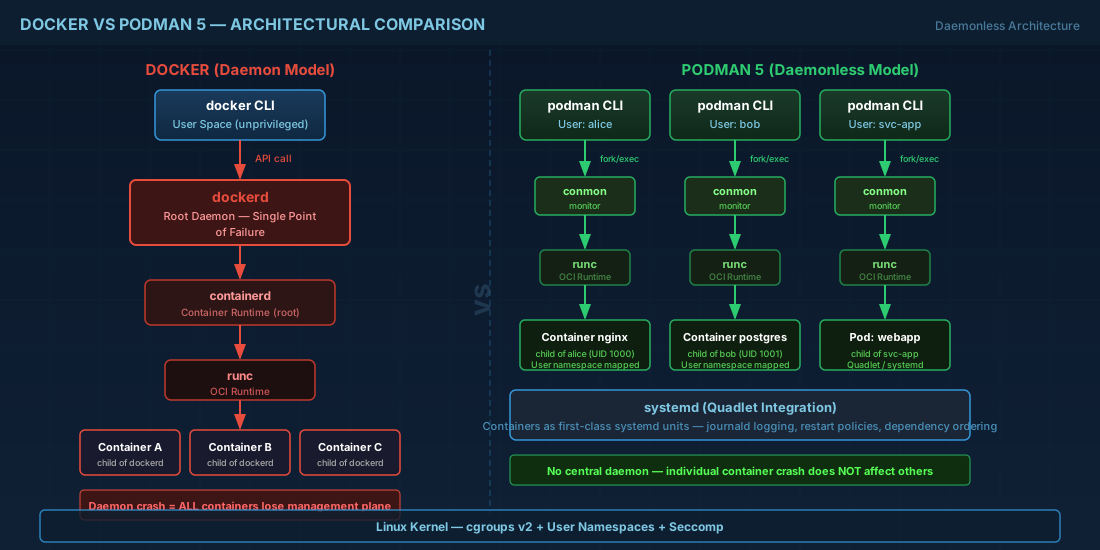
The key advantages Podman 5 brings:
- No root daemon — eliminates privilege escalation attack surface
- Fork/exec model — containers survive management process crashes
- User namespaces by default — rootless containers map to unprivileged UIDs on the host
- systemd integration — generate systemd units directly from running containers
- Pod support — Kubernetes-style pods natively, no extra tooling
Installation on Major Distributions
RHEL 9 / AlmaLinux 9 / Rocky Linux 9
# Podman 5 is in the default repos on RHEL 9.3+
sudo dnf install -y podman podman-compose buildah skopeo

# Verify version
podman --version
# podman version 5.x.x

# Enable lingering for your user (critical for rootless services)
sudo loginctl enable-linger $(whoami)
Debian 12 / Ubuntu 24.04
# Add the unstable/testing repo for Podman 5
sudo mkdir -p /etc/apt/keyrings
curl -fsSL "https://download.opensuse.org/repositories/devel:kubic:libcontainers:unstable/Debian_12/Release.key" \
  | gpg --dearmor | sudo tee /etc/apt/keyrings/devel_kubic_libcontainers_unstable.gpg > /dev/null

echo "deb [signed-by=/etc/apt/keyrings/devel_kubic_libcontainers_unstable.gpg] \
  https://download.opensuse.org/repositories/devel:kubic:libcontainers:unstable/Debian_12/ /" \
  | sudo tee /etc/apt/sources.list.d/devel:kubic:libcontainers:unstable.list

sudo apt update && sudo apt install -y podman buildah skopeo
The UID Mapping Secret Most Engineers Miss
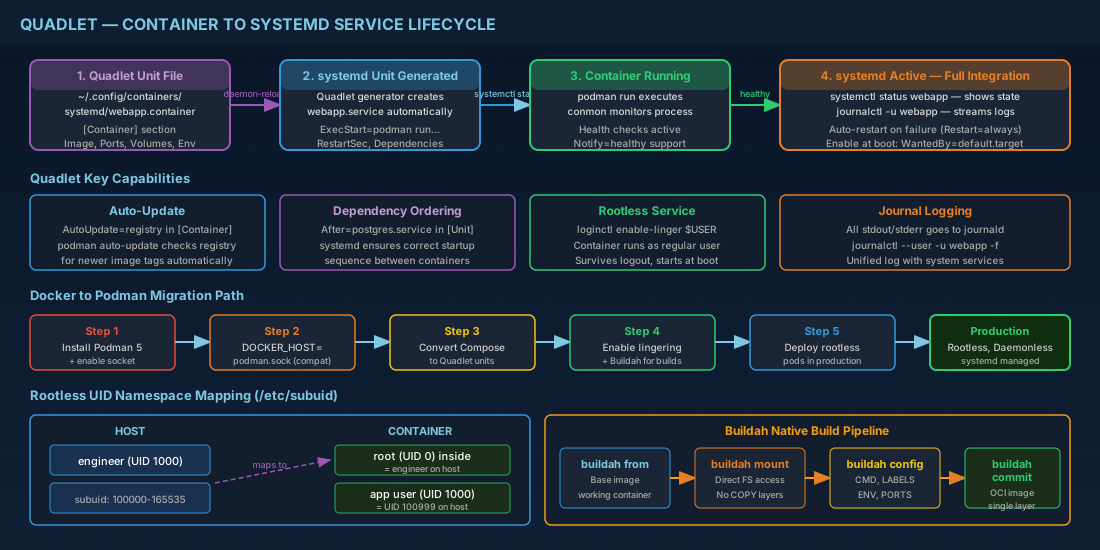
Rootless containers work by mapping UIDs inside the container to unprivileged UIDs on the host. The mappings are defined in /etc/subuid and /etc/subgid. Most guides tell you to set these and move on. Here is what they don't tell you:
# Check your current mappings
cat /etc/subuid
# engineer:100000:65536

# This means:
# - UID 0 inside the container maps to UID of the calling user on host
# - UID 1 inside container maps to UID 100000 on host
# - UID 2 inside container maps to UID 100001 on host
# ...up to UID 65535 maps to UID 165535

# The CRITICAL detail: file ownership on bind mounts
# If your container writes as UID 1000 (typical app user),
# it maps to UID 100999 on the host. Your host user CANNOT
# read those files without ACLs or matching subuid configuration.

# Solution 1: Use --userns=keep-id to map your host UID into the container
podman run --userns=keep-id -v ./data:/app/data:Z myimage

# Solution 2: Set up matching subordinate ranges
# Add to /etc/subuid: engineer:1000:1 (map container UID 1000 to host UID 1000)
sudo usermod --add-subuids 1000-1000 --add-subgids 1000-1000 engineer
podman system migrate
Docker Compose to Podman: The Real Migration Path
Podman supports docker-compose via a compatibility socket. But the truly production-ready approach uses podman-compose or, better yet, Quadlet — Podman's native systemd integration.
Step 1: Drop-in Docker CLI Compatibility
# Enable the Podman socket (Docker API compatible)
systemctl --user enable --now podman.socket

# Verify the socket
curl -s --unix-socket $XDG_RUNTIME_DIR/podman/podman.sock \
  http://localhost/_ping
# OK

# Point Docker CLI tools at Podman
export DOCKER_HOST=unix://$XDG_RUNTIME_DIR/podman/podman.sock

# Now docker-compose, lazydocker, Portainer, etc. all work with Podman
docker-compose up -d
Step 2: Convert to Quadlet (Production-Grade)
Quadlet lets you define containers as systemd unit files. This is where Podman truly shines — your containers become first-class systemd citizens with dependency ordering, restart policies, and journal logging.
# ~/.config/containers/systemd/webapp.container
[Unit]
Description=Production Web Application
After=network-online.target
Wants=network-online.target

[Container]
Image=docker.io/library/nginx:alpine
PublishPort=8080:80
Volume=/home/engineer/webapp/html:/usr/share/nginx/html:ro,Z
Volume=/home/engineer/webapp/nginx.conf:/etc/nginx/nginx.conf:ro,Z
Environment=TZ=UTC
HealthCmd=curl -f http://localhost/ || exit 1
HealthInterval=30s
HealthTimeout=5s
HealthRetries=3
AutoUpdate=registry
Notify=healthy

[Service]
Restart=always
RestartSec=10
TimeoutStartSec=120

[Install]
WantedBy=default.target
# Reload systemd to pick up the Quadlet file
systemctl --user daemon-reload
# Start the container as a systemd service
systemctl --user start webapp
# Check status — full systemd integration
systemctl --user status webapp
# View logs through journald
journalctl --user -u webapp -f
# Enable at boot (requires lingering)
systemctl --user enable webappBuilding Images Without Docker: Buildah Deep Dive
Buildah builds OCI images without a daemon. It can use Dockerfiles, but its native scripting interface allows builds that Dockerfiles literally cannot express.
#!/bin/bash
# build-app.sh — Buildah native build script

set -euo pipefail

# Create a working container from base image
ctr=$(buildah from registry.access.redhat.com/ubi9-minimal:latest)

# Mount the filesystem — direct access, no COPY layers
mnt=$(buildah mount $ctr)

# Install packages using the CONTAINER's package manager
# but from the HOST's shell — no RUN layer overhead
dnf install --installroot $mnt --releasever 9 \
    --setopt install_weak_deps=false -y \
    python3.12 python3.12-pip

# Copy application code directly into the mount
cp -r ./src $mnt/opt/app/
cp requirements.txt $mnt/opt/app/

# Install Python dependencies into the container
chroot $mnt pip3.12 install --no-cache-dir -r /opt/app/requirements.txt

# Clean up — this happens in ONE layer, not multiple
dnf --installroot $mnt clean all
rm -rf $mnt/var/cache/* $mnt/tmp/*

# Unmount
buildah unmount $ctr

# Configure the container
buildah config --cmd '["python3.12", "/opt/app/main.py"]' $ctr
buildah config --port 8000 $ctr
buildah config --label maintainer="team@company.com" $ctr
buildah config --env APP_ENV=production $ctr

# Commit — single layer, minimal size
buildah commit --squash $ctr myapp:latest

# Clean up
buildah rm $ctr

echo "Image built: $(podman images myapp:latest --format '{{.Size}}')"
Multi-Container Pods: Kubernetes Patterns Without Kubernetes
Podman pods group containers that share a network namespace — exactly like Kubernetes pods. This lets you develop locally with the same networking model you will deploy to production.
# Create a pod with port mappings
podman pod create --name webapp-pod \
    -p 8080:80 \
    -p 5432:5432

# Add nginx container to the pod
podman run -d --pod webapp-pod \
    --name nginx \
    -v ./nginx.conf:/etc/nginx/nginx.conf:ro,Z \
    docker.io/library/nginx:alpine

# Add app container — it shares localhost with nginx
podman run -d --pod webapp-pod \
    --name app \
    -v ./app:/opt/app:Z \
    myapp:latest

# Add postgres — also on localhost within the pod
podman run -d --pod webapp-pod \
    --name db \
    -e POSTGRES_PASSWORD=secret \
    -v pgdata:/var/lib/postgresql/data:Z \
    docker.io/library/postgres:16-alpine

# App connects to postgres at localhost:5432 — no Docker networks needed
# Nginx proxies to app at localhost:8000 — same network namespace

# Generate a Kubernetes YAML from the running pod
podman generate kube webapp-pod > webapp-pod.yaml

# Deploy that YAML to a real Kubernetes cluster
kubectl apply -f webapp-pod.yaml
Auto-Update: Zero-Downtime Image Refreshes
Podman's auto-update feature monitors registries and updates containers when new images are available — without orchestration tools like Watchtower.
# Label containers for auto-update when creating them
podman run -d --name webapp \
    --label io.containers.autoupdate=registry \
    -p 8080:80 \
    docker.io/library/nginx:alpine

# Or in Quadlet files (shown above):
# AutoUpdate=registry

# Enable the auto-update systemd timer
systemctl --user enable --now podman-auto-update.timer

# Check what would be updated (dry run)
podman auto-update --dry-run

# Force an update check now
podman auto-update

# View the timer schedule
systemctl --user list-timers podman-auto-update.timer
Performance Tuning: Secrets Most Teams Never Learn
# 1. Use native overlayfs instead of fuse-overlayfs (massive I/O improvement)
# Requires kernel 5.11+ and /etc/subuid configured
cat ~/.config/containers/storage.conf
[storage]
driver = "overlay"

[storage.options.overlay]
mount_program = ""  # Empty = native overlay, not fuse

# 2. Enable parallel image pulling
cat ~/.config/containers/containers.conf
[engine]
image_parallel_copies = 5

# 3. Use tmpfs for build context (speeds up large builds)
podman build --tmpfs /tmp:rw,size=2g -t myapp .

# 4. Pre-warm container filesystems
podman image mount myapp:latest

# 5. Reduce startup time with --init (proper PID 1)
podman run --init -d myapp:latest
Migrating from Docker: Complete Checklist
# 1. Export existing Docker images
docker save myapp:latest | podman load

# 2. Convert docker-compose.yml volumes
# Docker named volumes → Podman named volumes (automatic)
# Docker bind mounts → Add :Z suffix for SELinux relabeling

# 3. Convert Docker systemd services to Quadlet
# For each: docker run ... → create .container file

# 4. Migrate secrets
# Docker secrets → Podman secrets (compatible API)
echo "db_password" | podman secret create db_pass -
podman run --secret db_pass myapp:latest

# 5. Update CI/CD pipelines
# Replace: docker build/push
# With: buildah build / podman push (or skopeo copy)

# 6. Network migration
# Docker bridge networks → Podman networks (CNI or netavark)
podman network create --driver bridge app-network
podman run --network app-network myapp:latest
Podman 5 is not just "Docker without a daemon" — it is a complete container ecosystem designed for security-conscious production environments. The fork/exec model, native rootless support, Quadlet systemd integration, and Kubernetes pod compatibility make it the preferred choice for teams serious about container security and operational reliability.