Docker Architecture Overview
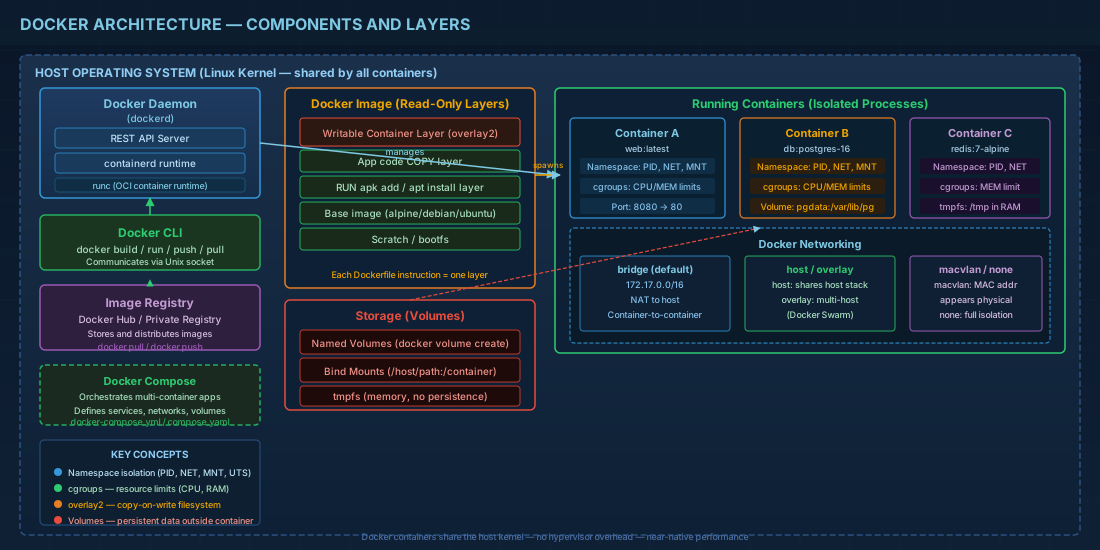
Docker revolutionized software deployment with OS-level virtualization through containers. Unlike traditional VMs, containers share the host kernel while maintaining isolated user spaces — delivering near-native performance with minimal overhead.
Core Components
Docker Daemon (dockerd)
The daemon is the background service that manages Docker objects. It listens for API requests and manages images, containers, networks, and volumes:
# Check daemon status
systemctl status docker

# View daemon configuration
cat /etc/docker/daemon.json

# Typical production configuration
{
    "storage-driver": "overlay2",
    "log-driver": "json-file",
    "log-opts": {
        "max-size": "10m",
        "max-file": "3"
    },
    "default-ulimits": {
        "nofile": { "Name": "nofile", "Hard": 64000, "Soft": 64000 }
    },
    "live-restore": true,
    "userland-proxy": false
}
Docker Images
Images are read-only templates built from layers. Each Dockerfile instruction creates a layer:
# Production-grade Dockerfile example
FROM php:8.3-fpm-alpine AS base

RUN apk add --no-cache \
    nginx \
    supervisor \
    && rm -rf /var/cache/apk/*

COPY --chown=www-data:www-data ./src /var/www/html
COPY nginx.conf /etc/nginx/http.d/default.conf
COPY supervisord.conf /etc/supervisord.conf

EXPOSE 80
HEALTHCHECK --interval=30s --timeout=3s \
    CMD curl -f http://localhost/ || exit 1

CMD ["/usr/bin/supervisord", "-c", "/etc/supervisord.conf"]
Containers
Containers are runnable instances of images with a writable layer on top:
# Run with resource limits
docker run -d \
    --name myapp \
    --memory="512m" \
    --cpus="1.5" \
    --restart=unless-stopped \
    --network=app-net \
    -v app-data:/var/www/html/storage \
    -p 8080:80 \
    myapp:latest

# Inspect container details
docker inspect myapp --format '{{.State.Status}}'

# View real-time logs
docker logs -f --tail 100 myapp

# Execute commands inside running container
docker exec -it myapp sh
Docker Networking
Docker provides several network drivers for different use cases:
- bridge — Default. Isolated network for containers on a single host
- host — Container shares the host's network stack directly
- overlay — Multi-host networking for Docker Swarm
- macvlan — Assigns a MAC address to containers, making them appear as physical devices
- none — No networking. Complete isolation
# Create a custom bridge network
docker network create --driver bridge \
    --subnet=172.20.0.0/16 \
    --gateway=172.20.0.1 \
    app-net

# Connect a running container
docker network connect app-net myapp
Storage and Volumes
# Named volumes (managed by Docker)
docker volume create app-data
docker run -v app-data:/data myapp

# Bind mounts (host directory)
docker run -v /host/path:/container/path myapp

# tmpfs mounts (memory only)
docker run --tmpfs /tmp:rw,noexec,nosuid myapp
Docker Compose for Multi-Container Apps
services:
  web:
    build: .
    ports:
      - "80:80"
    depends_on:
      db:
        condition: service_healthy
    environment:
      - DB_HOST=db
    networks:
      - app-net

  db:
    image: postgres:16-alpine
    volumes:
      - pgdata:/var/lib/postgresql/data
    environment:
      POSTGRES_PASSWORD_FILE: /run/secrets/db_pass
    healthcheck:
      test: ["CMD-SHELL", "pg_isready -U postgres"]
      interval: 10s
    networks:
      - app-net

volumes:
  pgdata:

networks:
  app-net:
    driver: bridge
Docker's architecture elegantly solves the "works on my machine" problem by packaging applications with their entire runtime environment. Understanding these building blocks is essential for building reliable, scalable infrastructure.