WireGuard has replaced IPsec and OpenVPN as the VPN protocol of choice for Linux engineers. With fewer than 4,000 lines of kernel code, it delivers better throughput than IPsec at a fraction of the configuration complexity. But most tutorials stop at point-to-point links. This guide shows you how to build a full mesh VPN architecture connecting multiple sites — the topology that production infrastructure actually needs.
Why Mesh, Not Hub-and-Spoke
A hub-and-spoke VPN routes all inter-site traffic through a central node. If Site A needs to reach Site C, traffic flows A → Hub → C. This doubles latency and creates a single point of failure at the hub. A mesh topology creates direct tunnels between every pair of sites — Site A talks directly to Site C with no intermediary.
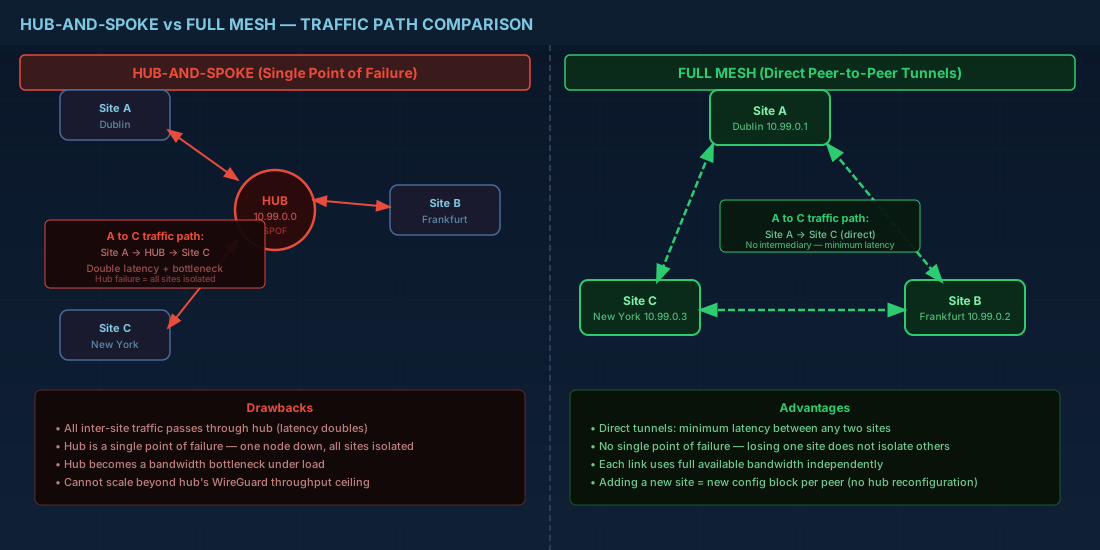
WireGuard makes mesh practical because each peer connection is stateless and lightweight. Adding a new peer is a configuration change, not a complex PKI operation.
Architecture: Three-Site Mesh
We will build a mesh connecting three sites:
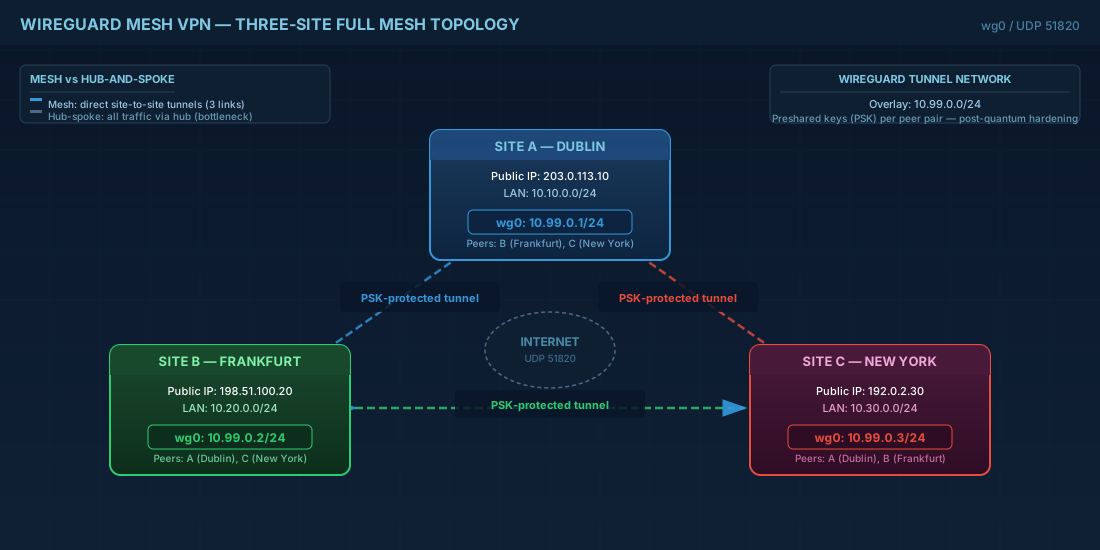
- Site A (Dublin) — 203.0.113.10 — LAN: 10.10.0.0/24
- Site B (Frankfurt) — 198.51.100.20 — LAN: 10.20.0.0/24
- Site C (New York) — 192.0.2.30 — LAN: 10.30.0.0/24
Each site gets a WireGuard interface with a /24 tunnel network: 10.99.0.0/24
Step 1: Install WireGuard on All Nodes
# RHEL 9 / Rocky / Alma
sudo dnf install -y wireguard-tools

# Debian 12 / Ubuntu 24.04
sudo apt install -y wireguard

# Verify kernel module
sudo modprobe wireguard
lsmod | grep wireguard
Step 2: Generate Key Pairs
# Run on EACH site — generate private and public keys
# The umask ensures the private key file is only readable by root

umask 077
wg genkey | tee /etc/wireguard/private.key | wg pubkey > /etc/wireguard/public.key

# View keys (you will need public keys from all sites)
cat /etc/wireguard/private.key
cat /etc/wireguard/public.key

# IMPORTANT: Also generate preshared keys for each peer pair
# PSK adds a layer of post-quantum resistance
wg genpsk > /etc/wireguard/psk-ab.key  # Between site A and B
wg genpsk > /etc/wireguard/psk-ac.key  # Between site A and C
wg genpsk > /etc/wireguard/psk-bc.key  # Between site B and C
Step 3: Configure Each Site
Site A — Dublin (10.99.0.1)
# /etc/wireguard/wg0.conf on Site A
[Interface]
Address = 10.99.0.1/24
ListenPort = 51820
PrivateKey = <site-a-private-key>

# Enable IP forwarding for routing between sites
PostUp = sysctl -w net.ipv4.ip_forward=1
PostUp = iptables -A FORWARD -i wg0 -j ACCEPT
PostUp = iptables -A FORWARD -o wg0 -j ACCEPT
PostDown = iptables -D FORWARD -i wg0 -j ACCEPT
PostDown = iptables -D FORWARD -o wg0 -j ACCEPT

# Peer: Site B (Frankfurt)
[Peer]
PublicKey = <site-b-public-key>
PresharedKey = <psk-ab>
Endpoint = 198.51.100.20:51820
AllowedIPs = 10.99.0.2/32, 10.20.0.0/24
PersistentKeepalive = 25

# Peer: Site C (New York)
[Peer]
PublicKey = <site-c-public-key>
PresharedKey = <psk-ac>
Endpoint = 192.0.2.30:51820
AllowedIPs = 10.99.0.3/32, 10.30.0.0/24
PersistentKeepalive = 25
Site B — Frankfurt (10.99.0.2)
# /etc/wireguard/wg0.conf on Site B
[Interface]
Address = 10.99.0.2/24
ListenPort = 51820
PrivateKey = <site-b-private-key>

PostUp = sysctl -w net.ipv4.ip_forward=1
PostUp = iptables -A FORWARD -i wg0 -j ACCEPT
PostUp = iptables -A FORWARD -o wg0 -j ACCEPT
PostDown = iptables -D FORWARD -i wg0 -j ACCEPT
PostDown = iptables -D FORWARD -o wg0 -j ACCEPT

# Peer: Site A (Dublin)
[Peer]
PublicKey = <site-a-public-key>
PresharedKey = <psk-ab>
Endpoint = 203.0.113.10:51820
AllowedIPs = 10.99.0.1/32, 10.10.0.0/24
PersistentKeepalive = 25

# Peer: Site C (New York)
[Peer]
PublicKey = <site-c-public-key>
PresharedKey = <psk-bc>
Endpoint = 192.0.2.30:51820
AllowedIPs = 10.99.0.3/32, 10.30.0.0/24
PersistentKeepalive = 25
Site C — New York (10.99.0.3)
# /etc/wireguard/wg0.conf on Site C
[Interface]
Address = 10.99.0.3/24
ListenPort = 51820
PrivateKey = <site-c-private-key>

PostUp = sysctl -w net.ipv4.ip_forward=1
PostUp = iptables -A FORWARD -i wg0 -j ACCEPT
PostUp = iptables -A FORWARD -o wg0 -j ACCEPT
PostDown = iptables -D FORWARD -i wg0 -j ACCEPT
PostDown = iptables -D FORWARD -o wg0 -j ACCEPT

# Peer: Site A (Dublin)
[Peer]
PublicKey = <site-a-public-key>
PresharedKey = <psk-ac>
Endpoint = 203.0.113.10:51820
AllowedIPs = 10.99.0.1/32, 10.10.0.0/24
PersistentKeepalive = 25

# Peer: Site B (Frankfurt)
[Peer]
PublicKey = <site-b-public-key>
PresharedKey = <psk-bc>
Endpoint = 198.51.100.20:51820
AllowedIPs = 10.99.0.2/32, 10.20.0.0/24
PersistentKeepalive = 25
Step 4: Bring Up the Mesh
# On each site, bring up the interface
sudo wg-quick up wg0

# Enable at boot
sudo systemctl enable wg-quick@wg0

# Verify the interface
sudo wg show

# Expected output on Site A:
# interface: wg0
#   public key: <site-a-public>
#   private key: (hidden)
#   listening port: 51820
#
# peer: <site-b-public>
#   preshared key: (hidden)
#   endpoint: 198.51.100.20:51820
#   allowed ips: 10.99.0.2/32, 10.20.0.0/24
#   latest handshake: 12 seconds ago
#   transfer: 1.24 MiB received, 3.47 MiB sent
#
# peer: <site-c-public>
#   ...
Step 5: Verify Full Mesh Connectivity
# From Site A: test tunnel endpoints
ping -c 3 10.99.0.2   # Site B tunnel
ping -c 3 10.99.0.3   # Site C tunnel

# From Site A: test reaching remote LANs
ping -c 3 10.20.0.1   # Device on Site B LAN
ping -c 3 10.30.0.1   # Device on Site C LAN

# From Site B: verify direct path to Site C (not through A)
traceroute 10.30.0.1
# Should show: 10.99.0.3 → 10.30.0.1 (direct, not via 10.99.0.1)

# Performance test between sites
# Install iperf3 on endpoints
iperf3 -s  # On Site B
iperf3 -c 10.99.0.2 -t 30  # From Site A

# You should see near wire-speed for the underlying connection
# WireGuard adds ~60 bytes overhead per packet
Firewall Rules for WireGuard
# Allow WireGuard UDP port on each site's public interface
sudo firewall-cmd --permanent --add-port=51820/udp
sudo firewall-cmd --reload

# For nftables users:
sudo nft add rule inet filter input udp dport 51820 accept

# IMPORTANT: Also allow forwarding for routed traffic
sudo firewall-cmd --permanent --add-masquerade
sudo firewall-cmd --reload
Dynamic Mesh with wg-dynamic (Experimental)
For larger meshes (10+ sites), manual peer configuration becomes unwieldy. wg-dynamic is an experimental protocol for automatic peer discovery and IP assignment. Until it stabilizes, here is a practical alternative using a configuration management approach:
#!/bin/bash
# mesh-config-gen.sh — Generate WireGuard mesh configs from a site inventory
# Usage: ./mesh-config-gen.sh sites.json

set -euo pipefail

SITES_FILE="$1"
OUT_DIR="./wg-configs"
mkdir -p "$OUT_DIR"

# Read site count
SITE_COUNT=$(jq '.sites | length' "$SITES_FILE")

for i in $(seq 0 $((SITE_COUNT - 1))); do
    SITE=$(jq -r ".sites[$i]" "$SITES_FILE")
    NAME=$(echo "$SITE" | jq -r '.name')
    PRIVKEY=$(echo "$SITE" | jq -r '.private_key')
    TUNNEL_IP=$(echo "$SITE" | jq -r '.tunnel_ip')

    CONFIG="$OUT_DIR/$NAME.conf"

    cat > "$CONFIG" << EOF
[Interface]
Address = $TUNNEL_IP/24
ListenPort = 51820
PrivateKey = $PRIVKEY

PostUp = sysctl -w net.ipv4.ip_forward=1
EOF

    # Add every OTHER site as a peer
    for j in $(seq 0 $((SITE_COUNT - 1))); do
        [ "$i" -eq "$j" ] && continue

        PEER=$(jq -r ".sites[$j]" "$SITES_FILE")
        PEER_PUB=$(echo "$PEER" | jq -r '.public_key')
        PEER_EP=$(echo "$PEER" | jq -r '.endpoint')
        PEER_TUN=$(echo "$PEER" | jq -r '.tunnel_ip')
        PEER_LAN=$(echo "$PEER" | jq -r '.lan_cidr')

        cat >> "$CONFIG" << EOF

[Peer]
PublicKey = $PEER_PUB
Endpoint = $PEER_EP:51820
AllowedIPs = $PEER_TUN/32, $PEER_LAN
PersistentKeepalive = 25
EOF
    done

    echo "Generated: $CONFIG"
done
Monitoring WireGuard in Production
# Prometheus exporter for WireGuard metrics
# Install wireguard_exporter
go install github.com/mdlayher/wireguard_exporter/cmd/wireguard_exporter@latest

# Run it (exposes metrics on :9586)
sudo wireguard_exporter -metrics.addr :9586

# Key metrics exposed:
# wireguard_peer_last_handshake_seconds — time since last handshake
# wireguard_peer_receive_bytes_total — bytes received from peer
# wireguard_peer_transmit_bytes_total — bytes sent to peer
# wireguard_peer_allowed_ips_count — number of allowed IPs

# Quick health check script
#!/bin/bash
for peer in $(sudo wg show wg0 peers); do
    handshake=$(sudo wg show wg0 latest-handshakes | grep "$peer" | awk '{print $2}')
    now=$(date +%s)
    age=$((now - handshake))

    if [ "$age" -gt 180 ]; then
        echo "ALERT: Peer $peer last handshake ${age}s ago"
    fi
done
Security Hardening
# 1. Restrict wg0.conf permissions
chmod 600 /etc/wireguard/wg0.conf
chown root:root /etc/wireguard/wg0.conf

# 2. Use preshared keys for every peer (post-quantum resistance)
# Already shown above — ALWAYS use PresharedKey

# 3. Limit AllowedIPs to exact needed ranges
# NEVER use 0.0.0.0/0 in a mesh — it catches ALL traffic
# Only list the specific subnets each site needs to reach

# 4. Rotate keys periodically
# Generate new keypair
wg genkey | tee /etc/wireguard/new-private.key | wg pubkey > /etc/wireguard/new-public.key

# Hot-swap the key without downtime
sudo wg set wg0 private-key /etc/wireguard/new-private.key

# Then update peer configs on other sites with the new public key
# This can be scripted and automated via Ansible/Salt

# 5. Kernel hardening
echo "net.ipv4.conf.all.rp_filter = 1" >> /etc/sysctl.d/99-wireguard.conf
echo "net.ipv4.conf.wg0.rp_filter = 1" >> /etc/sysctl.d/99-wireguard.conf
sysctl -p /etc/sysctl.d/99-wireguard.conf
WireGuard mesh VPNs give you direct site-to-site encryption with minimal configuration overhead. Unlike IPsec tunnels that require complex IKE negotiations and certificate management, WireGuard peers connect with a single public key exchange. For multi-site Linux infrastructure, this is the architecture that balances security, performance, and operational simplicity.